How to Set eBay Alerts for New Listings
Two ways to be told when an item you want gets listed. Native eBay alerts are free and arrive once a day. The other option arrives in seconds and costs money. Both are set up below, and the difference between them decides which one you need. By the end of this you’ll have a working alert for a specific item, and you’ll know exactly how long after a listing appears you’ll hear about it.
Before you start
Have the search itself ready first. An alert is only as good as the query behind it, and a vague query produces an email full of things you didn’t want.
- Know the exact model name or number if there is one.
- Decide your price ceiling. You can filter on it, and it cuts most of the noise.
- Decide whether you care about condition. New only, used only, or either.
One warning before you start filtering hard. eBay only emails you when something new matched in the past day. A search with keywords plus a price band plus a condition plus a category can match nothing for a week, and a week of silence looks identical to a broken alert.
Method 1. eBay saved search alerts
Step 1. Run the search
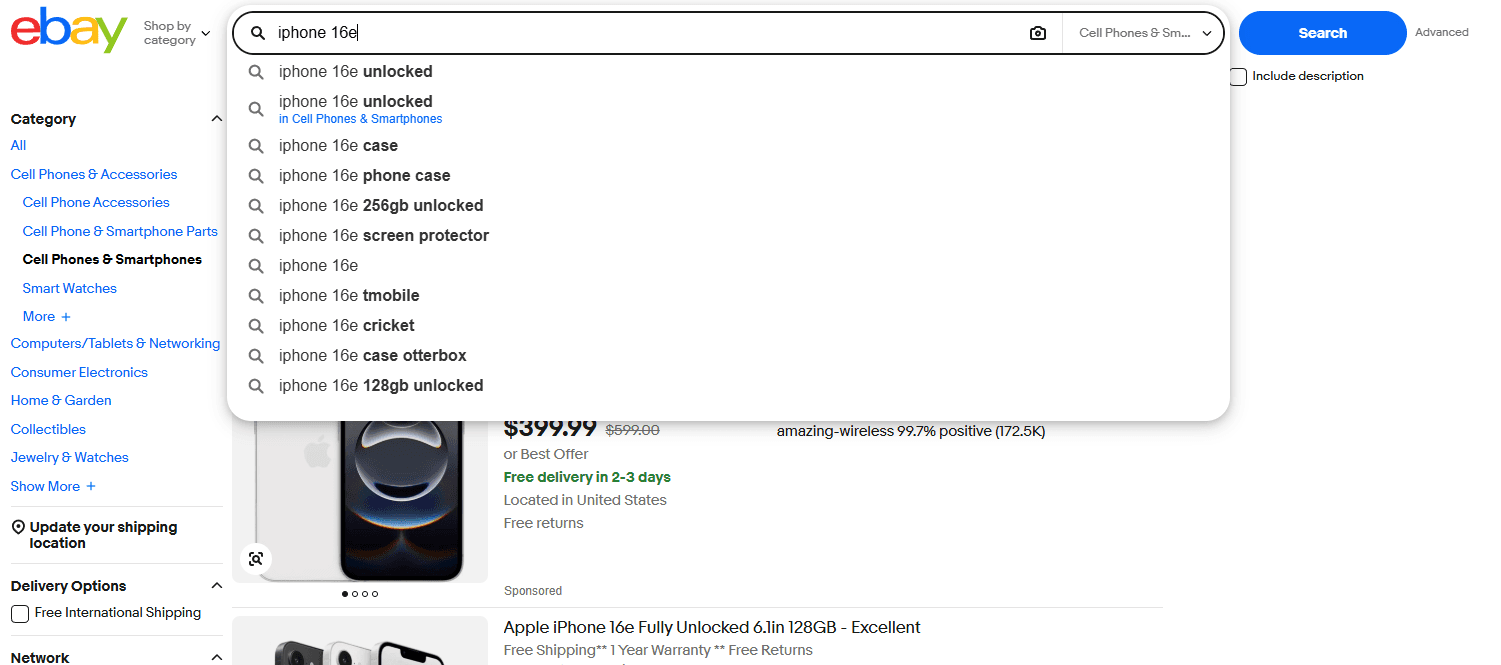
Search on ebay.com, apply your filters, and change the sort order to Newly Listed. Sorting this way matters more than it looks, because it shows you whether anything new actually appears in this search, which tells you how often to expect an email.
You should see results with recent listing dates at the top. If the newest item is three weeks old, your search is too tight and it will produce no alerts. Loosen it now rather than wondering later.
Step 2. Save the search
Click Save this search, the heart beside the result count. It lands in My eBay under Saved Searches.
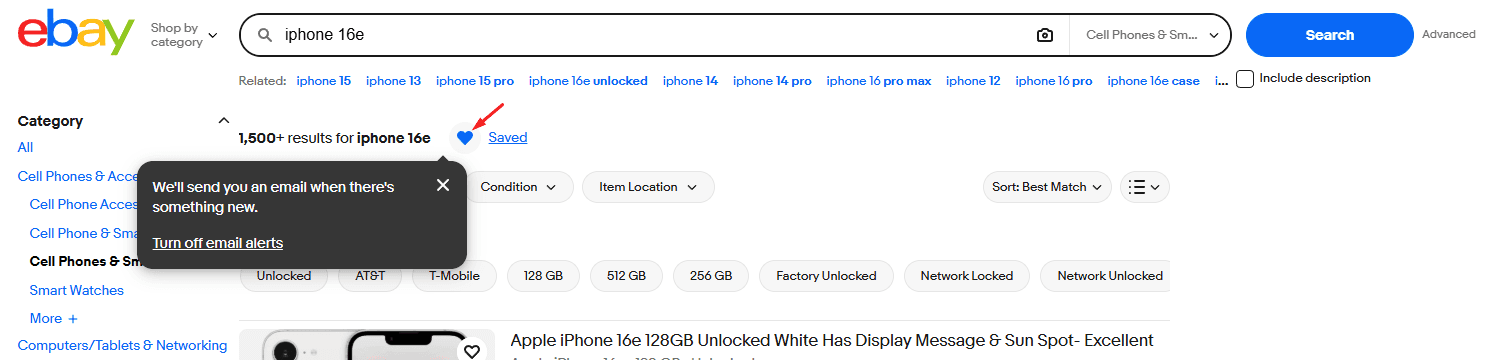
You should see the heart fill in and the search appear at https://www.ebay.com/mye/myebay/savedsearches, which also shows how many saved searches you’re currently using. eBay caps the number per account, so check that page if saving stops working.
Step 3. Turn the email toggle on for that search
This is the step that gets missed. Saving a search doesn’t switch on alerts. Open My eBay, then Saved Searches, find the one you just made, and turn on its email notification.
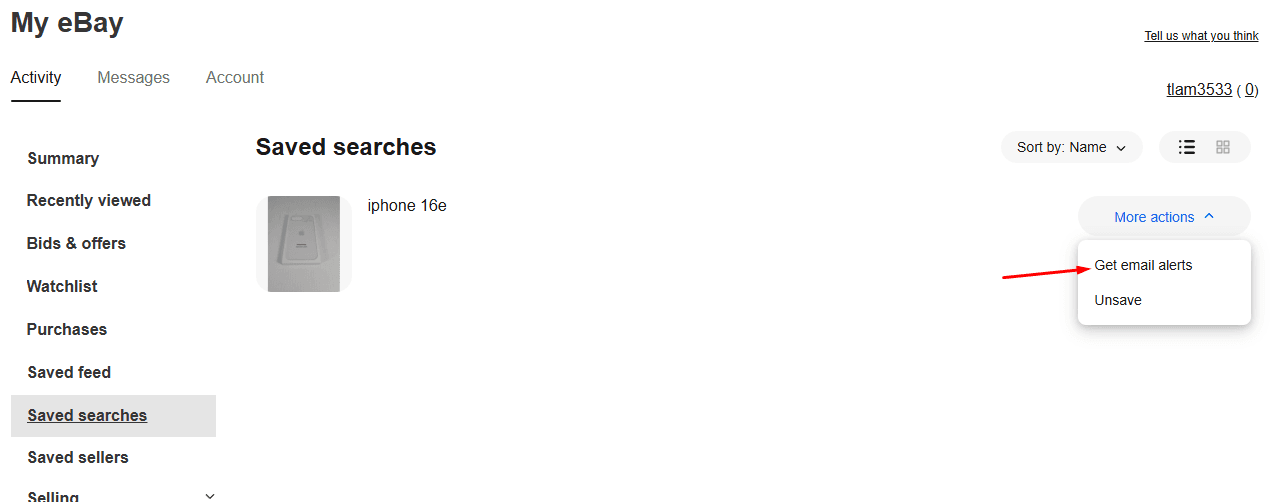
If this happens: you saved the search in the app and can’t find the toggle on the website, or the other way round. The app and website settings have drifted apart for years, so check both and set it in the place where you’ll actually read the email.
Step 4. Check your account-level email settings
The per-search toggle isn’t enough on its own. Open Account Settings, then Communication Preferences, and make sure buying notifications are switched on there too. One off switch at either level stops everything.

Step 5. Whitelist eBay in your email
Add eBay to your safe senders and check your spam and promotions folders now, before you start waiting. Gmail reroutes these emails once you ignore a batch, and after that they stop appearing in your inbox even though eBay is still sending them.
What you actually get
Then wait 24 hours. If listings matching your search appeared in that window, an email arrives. If nothing new was listed, no email arrives and nothing is wrong.
To test it, save a deliberately broad search for a day, such as a common brand with no filters. If that one emails you and your real search doesn’t, the alert system works and your query is too narrow.
eBay sends saved search emails at most once per day, and only when new listings matched in the previous 24 hours. That isn’t a setting you’ve configured wrongly, and there’s no toggle that changes it. A listing posted at nine in the morning reaches you in tomorrow’s digest.
For most shopping that’s fine. If you want a specific book, a spare part or a size of jacket, a daily email finds it and nobody else was racing you for it.
It stops being fine when the item is worth more than it’s listed for. Underpriced listings on eBay sell in minutes, sometimes in seconds for popular electronics and trading cards. By the time a daily digest tells you, the listing has been gone for most of a day.
Method 2. Lotify
Lotify watches eBay listings as they publish and sends each match to Telegram within seconds. One message per listing, with the photo, the price and the link.
A walkthrough of the same steps if you’d rather watch than read:
Step 1. Open the bot
Open @lotifybot in Telegram and press Start. There’s no account to create and no card to enter.
Step 2. Set up your search
Choose eBay as the marketplace, then enter your keywords, your price range and the words you want excluded. Use the same query you built in Step 1 of Method 1, since the work of getting it right is already done.
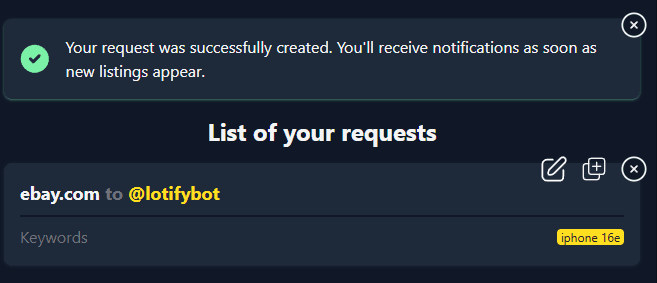
You should see the bot confirm the search and start watching. Matches begin arriving as soon as sellers post them.
Which one you need
- Use eBay’s own alerts if you’re buying a few times a year and nobody is competing with you for the item. They’re free, they work, and paying for anything more would be a waste.
- Use Lotify if you’re hunting things that get taken quickly. Resellers, collectors, anyone watching for a part that rarely comes up. The daily digest isn’t slow because eBay is bad at email. It’s slow because a digest is what it is.
Free Trial Available
Lotify offers a 7-day free trial with no registration or credit card required. Test it out and see how many deals you’ve been missing.
Common problems
No emails for days
Usually the search, not the alert. Very tight filters match nothing new for long stretches. Open the search, sort by Newly Listed, and see whether anything has been listed at all this week.
Emails stopped after working for months
Check spam and promotions first, then the per-search toggle, then Communication Preferences. Long-running saved searches also go quiet sometimes and come back if you delete and recreate them.
The toggle is on but nothing arrives
Set it in both the app and on the website. The two have been out of sync for years, and having it on in one place doesn’t guarantee the other.
Alerts arrive but the item is already sold
Nothing is broken. This is the once-a-day limit doing what it does, and no configuration changes it.
FAQ
How do I set up eBay alerts for new listings?
Run your search on ebay.com with your filters and sort by Newly Listed. Click Save this search, the heart beside the result count. Then open My eBay, go to Saved Searches, find the search and turn on its email notification. Finally, check that buying notifications are on under Account Settings → Communication Preferences, and add eBay to your email’s safe senders.
How often does eBay send saved search emails?
At most once per day, and only when new listings matched in the previous 24 hours. That is not a setting you have configured wrongly, and there is no toggle that changes it. A listing posted at nine in the morning reaches you in tomorrow’s digest.
Why am I not getting eBay saved search emails?
Usually the search, not the alert. Very tight filters can match nothing new for a week, and a week of silence looks identical to a broken alert. Open the search, sort by Newly Listed and see whether anything has been listed at all.
If listings are appearing, check spam and promotions, then the per-search toggle, then Communication Preferences. Set the toggle in both the app and on the website, since the two have been out of sync for years.
Where are my saved searches on eBay?
In My eBay under Saved Searches, at https://www.ebay.com/mye/myebay/savedsearches. That page also shows how many saved searches you are using. eBay caps the number per account, so check it if saving stops working.
How do I test whether my eBay alert is working?
Save a deliberately broad search for a day, such as a common brand with no filters. If that one emails you and your real search does not, the alert system works and your query is too narrow.
Why do eBay alerts arrive after the item has already sold?
Nothing is broken. It is the once-a-day limit doing what it does. Underpriced listings on eBay sell in minutes, sometimes seconds for popular electronics and trading cards, so by the time a daily digest arrives the listing has often been gone for most of a day. An instant alert service such as Lotify sends each match to Telegram within seconds instead.

2026-09-14
