How to Automate eBay Search
Four ways to make eBay search run without you, ordered by how much work they take. Two of them are free. One of them will get your account blocked, and it’s the one most people try first.
First, which bot do you mean
Search for “eBay bot” and you get five different products wearing one word. Sort out which one you want before you go any further.
| Kind | What it does | Allowed |
|---|---|---|
| Search or alert bot | Watches for new listings and tells you | Yes |
| Sniping bot | Places your bid in the closing seconds | Yes, long established |
| Listing bot | Posts and relists items for sellers | Yes, seller side |
| Scraper | Pulls listing data off the results pages | No |
| Buy-for-me agent | Decides and orders without you | No, since February 2026 |
This article is about the first one. If you came here for sniping, that’s a different tool, and it runs at the end of an auction rather than at the start of a listing.
On 20 February 2026 an updated eBay User Agreement took effect. It bans third-party “buy-for-me agents, LLM-driven bots” and any end-to-end flow that places an order without a human reviewing it, unless eBay grants permission first. The version before it covered robots and scrapers in general terms. This one names AI agents specifically.
Read what that leaves open, because it’s more than people assume. Automation that finds listings and shows them to you is fine. Automation that decides and buys is not.
Option 1. eBay saved searches
Free, built in, and the right answer for most people.
Run your search, apply the filters, click Save this search, then open My eBay and turn on the email notification for that specific search. Saving it doesn’t switch alerts on, which is the step almost everyone misses.
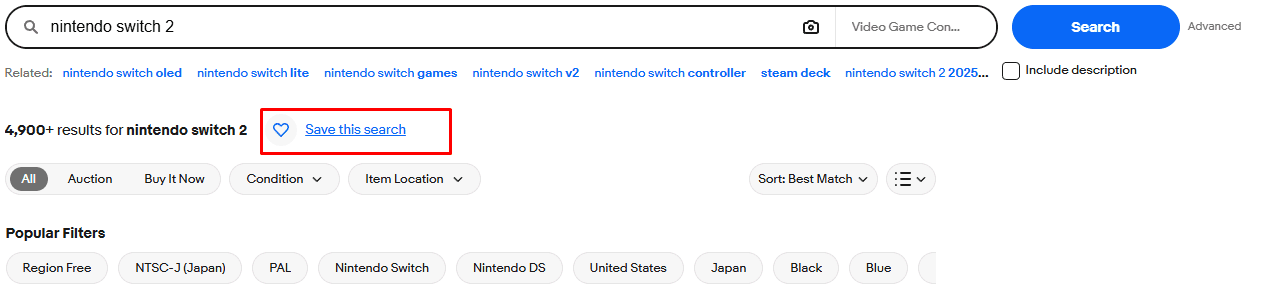
For most shopping that’s enough. A spare part, a book, a size that rarely comes up in your country. Nobody is racing you for those, and a daily digest finds them.
We covered the setup and the ways it fails in more detail in how to set eBay alerts for new listings.
Option 2. A third-party alert service
Several services poll eBay continuously and push matches to you within seconds. Most run on eBay’s official API, which is what makes them legitimate rather than a scraper with a friendly interface.
What to check before paying for one.
- Does it use the official API, or does it read the website? The second kind breaks whenever eBay changes a layout or page.
- Does it ask for your eBay password? Nothing legitimate needs it.
- How many searches you get for the price, since that’s what the pricing actually turns on.
- Where the alert arrives. Email puts you back where you started, in a folder you check every few hours.
Option 3. Build it yourself on eBay’s API
If you write code, eBay hands you the tools. The Browse API lets you search listings by keyword, category, product code or image, with filters on top.
You need to register for a developer account, which is separate from your buying account and has to be approved. Generate your keys. Start in the sandbox, then apply for production access. Then comes the number that decides whether this is worth doing: the default limit on the Buy APIs is 5,000 calls a day. Higher limits exist, through a review eBay calls an Application Growth Check, but 5,000 is what you start with.
| Searches you watch | How often each can run |
|---|---|
| 1 | Every 20 seconds |
| 5 | Every 90 seconds |
| 10 | Every 3 minutes |
| 25 | Every 8 minutes |
One search polled every twenty seconds is genuinely fast and costs nothing but your time. Twenty-five searches at eight-minute intervals is slower than it sounds when the listing you want sells in four.
Option 4. Scraping
This is the one most people try first, because it takes thirty seconds and needs no account.
You install a browser extension that reloads the results page every minute, or you write a script that fetches the search URL on a timer. No API, no keys, no approval. It works for a day or two.
Then eBay stops serving you. Either a screen reading Pardon Our Interruption, which is the bot detection reacting to your browser, or an Access Denied page with a long reference number, which is eBay’s traffic filter blocking your IP address rather than your browser.
Both are the same underlying problem. Repeatedly requesting a search page on a timer looks identical to scraping at the network level, and nothing about your intentions is visible there. We covered how to tell the two screens apart and what to do about each in why eBay thinks you are a bot.
It’s also the thing eBay’s User Agreement has banned longest, well before the AI clause arrived. Reading listing data off the results pages with a script is the textbook case.
Why use Lotify
Lotify watches eBay listings as they publish and sends each match to Telegram within seconds, one message per listing, with the photo, the price and the link. You set the keywords, the marketplace, the price range and the words to exclude.
Free Trial Available
Lotify offers a 7-day free trial with no registration or credit card required. Test it out and see how many deals you’ve been missing.
It never asks for your eBay password and never signs in as you. It doesn’t place orders. Alerts land in Telegram rather than in an inbox you check twice a day.
Setup takes about a minute, and the video below walks through it if you’d rather watch.
FAQ
Is it allowed to use a bot on eBay?
It depends on what the bot does. Search and alert bots that watch for new listings and tell you are fine, sniping tools are long established, and listing tools are allowed on the seller side. Scrapers that pull listing data off the results pages are not allowed, and neither are buy-for-me agents that decide and order without you.
The short version: automation that finds listings and shows them to you is fine. Automation that decides and buys is not.
Does eBay ban AI shopping agents?
Yes. An updated eBay User Agreement took effect on 20 February 2026. It bans third-party “buy-for-me agents, LLM-driven bots” and any end-to-end flow that places an order without a human reviewing it, unless eBay grants permission first. The version before it covered robots and scrapers in general terms. This one names AI agents specifically.
What is the free way to automate an eBay search?
eBay saved searches. Run your search, apply the filters, click Save this search, then open My eBay and turn on the email notification for that specific search. Saving it does not switch alerts on, which is the step almost everyone misses.
For a spare part, a book, or a size that rarely comes up, a daily digest is enough because nobody is racing you for it.
How many searches can I run on the eBay Browse API?
The default limit on eBay’s Buy APIs is 5,000 calls a day. Higher limits exist through a review eBay calls an Application Growth Check, but 5,000 is what you start with.
Spread across your searches, that works out to one search every 20 seconds, five searches every 90 seconds, ten every 3 minutes, or 25 every 8 minutes.
Why does eBay show “Pardon Our Interruption” or “Access Denied”?
Both mean eBay has decided your traffic looks automated. “Pardon Our Interruption” is the bot detection reacting to your browser. An Access Denied page with a long reference number is eBay’s traffic filter blocking your IP address rather than your browser.
The usual cause is reloading a search page on a timer, with a browser extension or a script. At the network level that looks identical to scraping, and nothing about your intentions is visible there.
What should I check before paying for an eBay alert service?
Whether it uses eBay’s official API or reads the website (the second kind breaks whenever eBay changes a page), whether it asks for your eBay password (nothing legitimate needs it), how many searches you get for the price, and where the alert arrives. Email puts you back where you started, in a folder you check every few hours.

2026-09-14
