Why Is eBay Search Not Working and How to Fix It
eBay search fails in four ways and people describe all four the same way. Results load and vanish a second later. You get zero results for a word that obviously has listings. Filters reset every time you search. Or the page won’t load at all.
By the end of this you’ll know which one you have, whether the fault is eBay’s or yours, and what to change. Only one of the four is usually eBay’s fault.
Step 1. Rule out an eBay outage
Open the eBay Community board called Report eBay Technical Issues and sort by newest. Then check eBay’s own system status page, which lists components separately, so search can be down while the rest of the site works.
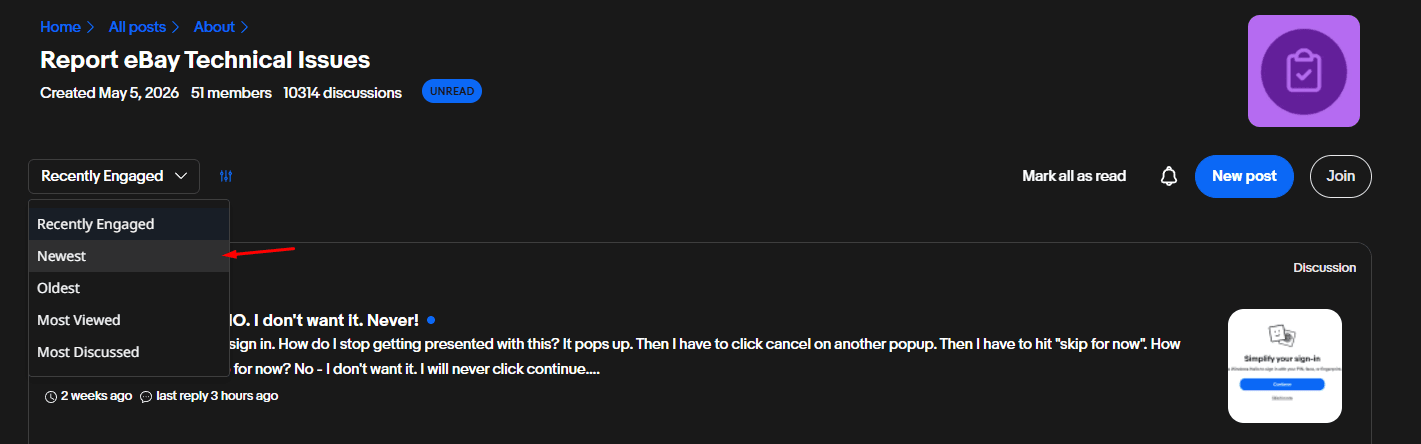
You should see either a board full of posts from the last hour saying the same thing you’re experiencing, or a quiet board. Sellers post within minutes of search breaking and others confirm it from several countries, which in practice makes the board faster than the status page.
If the board is busy it’s an outage and there’s nothing to fix on your side. Real eBay outages are short, usually minutes rather than hours. Come back later.
If the board is quiet the problem is yours. Continue.
Step 2. Find out whether your browser is the cause
Open eBay in a private or incognito window and run the same search. If you’re on the app, run the search on your phone using mobile data instead of wifi.
You should see one of two outcomes, and they send you to different places.
Search works in the private window. Your normal browser is the cause. Go to Step 3.
Search fails there too, or you’re in the app. Skip to Step 6.
This one test settles most cases and it takes longer to explain than to do.
Step 3. Turn off the anti-circumvention filters in your ad blocker
This is the cause almost nobody guesses, and it’s the one behind most of the “results appear and then disappear” reports.
Ad blockers ship filters aimed at ads built to dodge blockers. eBay’s promoted listings sit inside the organic results grid, so when eBay changes how they’re served, the blocker takes out the whole grid instead of the ads. Results load, then blank.
In Adblock Plus, open the Advanced menu and turn off the ABP filters. In uBlock Origin, open the filter lists and turn off the anti-circumvention list. Then reload the results page.
You should see your listings survive the page load instead of disappearing.
If they do, whitelist ebay.com in the blocker so you don’t lose them again next time eBay changes something.
If nothing changes, turn the blocker off entirely for one search to be certain before you rule it out. Other extensions can do the same thing, so test in a browser profile with no extensions if you’re still unsure.
Step 4. Force a literal search with quotes
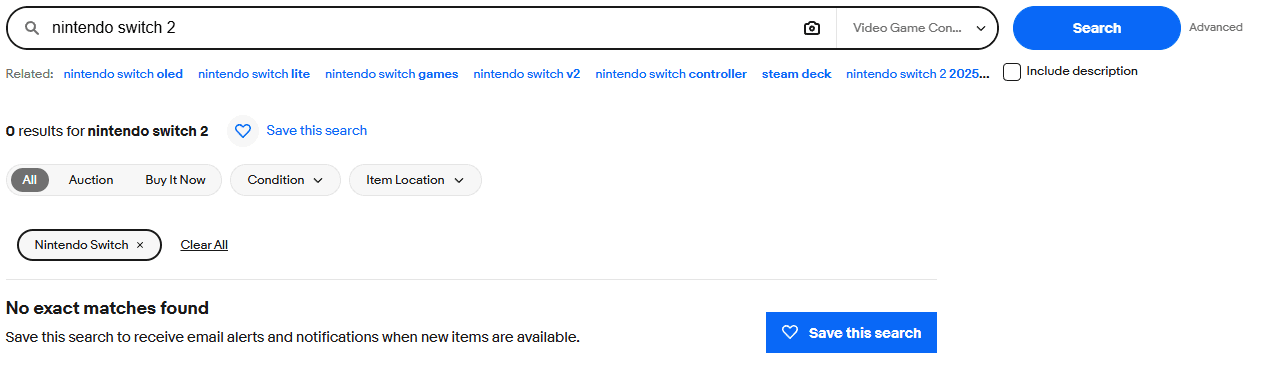
Use this when a common word returns nothing and eBay then shows you unrelated items from another category.
eBay does two things behind the scenes. It substitutes keywords it decides you meant, and it moves you into a category it decides you want. When either guess is wrong you end up in a category where your word has no listings, and eBay reports zero.
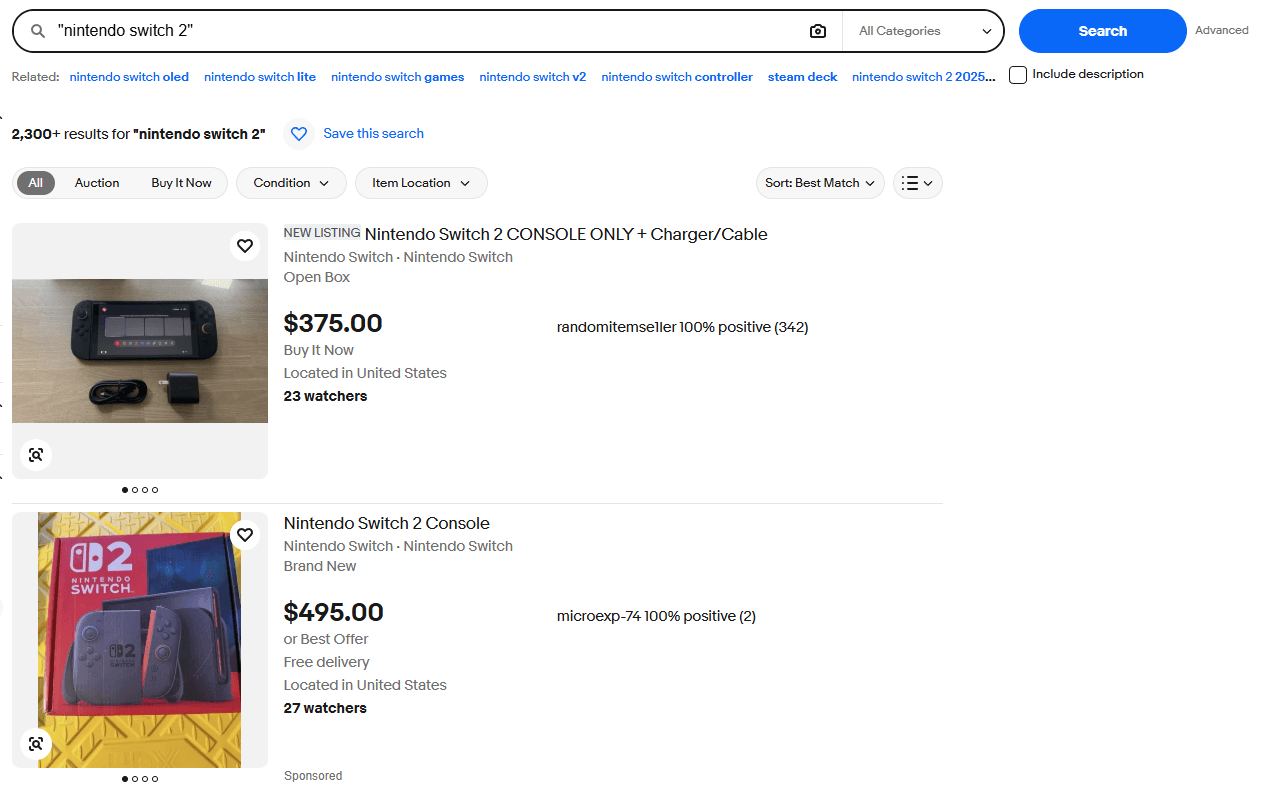
Put one of your keywords in quotes and search again.
You should see the literal word matched, with no substitution and no category jump.
If this happens, you’ll probably need to pick your category again by hand, because the quotes stopped eBay from choosing one for you. That’s the trade and it’s usually worth it.
This is also the fix for a search you’ve used for years that suddenly stops returning anything. Nothing changed on your side. eBay changed what it thinks your words mean.
Step 5. Clear a stuck seller field on Advanced Search
Use this one only if Advanced Search returns your own listings or nothing at all.
The Advanced Search page has a “search by seller” field below the fold. Chrome’s autofill drops your own username or email into it while you scroll past. Your search then runs as a seller search, and the form looks empty because you never scrolled far enough to see the field.
Click into that seller field and check whether your username appears.
You should see an autofill dropdown offering your own username or email address.
If you do, clear the field, then remove the entry from Chrome’s autofill settings so it doesn’t come back.
Step 6. App only. Check your filters and your marketplace
Three things, in this order.
Locked filters. The app lets you lock a filter so it applies to every search. Lock “US only” once and months later you’re searching a fraction of the catalogue without knowing it. Open the filter customise menu and look for blue lock icons.
Country and site. Open Settings, then Country/Region, then eBay Sites. If the app points at a marketplace you never buy from, your results will look wrong and no amount of reinstalling will change that.
Filters that reset themselves. Filters jumping back to All Categories and Worldwide after every search is a known bug, not something you configured wrong. eBay staff have acknowledged it on the community boards. Reinstalling the app buys a few minutes and then it returns.
You should see your filters holding across two consecutive searches.
If they don’t, you’re waiting on eBay. Use the browser for anything where the filter matters.
Verify
Run one search you know should return many results, such as a common brand name, with no filters and no category selected.
If it returns a full page of listings and they’re still there five seconds later, search is working.
Common problems
Clearing cache and cookies did nothing. It only fixes one family of symptoms, the ones where the category sidebar sends you to a category home page instead of your results, or the filter menu vanishes. eBay support opens with this for everything, which is why it has a bad reputation.
It works in Edge but not Chrome. An extension or a stale cookie, not eBay. Work through Step 3 in the browser that fails.
Everything works and the results are still wrong. Nothing is broken. See the next section.
Why eBay search is bad even when it works
Some of the people searching for this have nothing to fix. Search is doing what eBay built it to do, and that’s the complaint.
Best Match ranks your results using how closely a listing matches your words, how popular the item is, its price, where it sits, what you browsed before, the seller’s record and how complete the listing is. Promoted listings matching your query get lifted on top of that. Item specifics carry real weight now, so a listing with the right words in the title and thin specifics can rank below one with vague wording and complete specifics.
Add the AI layer eBay has been testing in search for years and the gap widens between what you typed and what you get. Sellers have been complaining about relevance in eBay’s own forum for about as long as the forum has existed.
You can’t fix that. Quotes, a manually chosen category and a saved search are the tools you have.
The failure this guide can’t fix
Every problem above is loud. The page is empty, the filters jump, the results blink out. You notice in seconds and you go looking for a fix. The quiet failure costs more. Your search works, it returns results, and the listing you wanted appeared four hours ago and sold. Nothing looked broken. You weren’t there.
Lotify watches eBay listings as they publish and sends each match to Telegram within seconds, one message per listing, with the photo, the price and the link. You set the keywords, the marketplace, the price range and the words to exclude. It doesn’t depend on you keeping a results page open, or on eBay’s search behaving that day.
Free Trial Available
Lotify offers a 7-day free trial with no registration or credit card required. Test it out and see how many deals you’ve been missing.
It costs money after the trial, $19.99 a month for up to 12 searches, and it lives in Telegram. If you buy on eBay a few times a year, fix your ad blocker and carry on. If you’re on eBay daily chasing the same items, the search page was never going to be fast enough for that.
FAQ
Is eBay search down right now?
Check the eBay Community board called Report eBay Technical Issues and sort by newest. If it is full of posts from the last hour describing the same problem, it is an outage and there is nothing to fix on your side. Real eBay outages are usually minutes rather than hours. If the board is quiet, the problem is on your side.
Why do eBay search results appear and then disappear?
Usually your ad blocker. Ad blockers ship anti-circumvention filters aimed at ads built to dodge blockers, and because eBay’s promoted listings sit inside the organic results grid, the blocker can take out the whole grid. In Adblock Plus, turn off the ABP filters in the Advanced menu. In uBlock Origin, turn off the anti-circumvention filter list. Then whitelist ebay.com.
Why does eBay show zero results for a word that obviously has listings?
eBay substitutes keywords it decides you meant and moves you into a category it decides you want. When either guess is wrong, you land in a category where your word has no listings. Put one of your keywords in quotes and search again: that forces a literal match with no substitution and no category jump, though you may need to pick the category again by hand.
Why does eBay Advanced Search return only my own listings?
Chrome’s autofill can drop your own username or email into the “search by seller” field below the fold, so the search runs as a seller search. Click into that field, clear it, and remove the entry from Chrome’s autofill settings so it does not come back.
Why do my eBay app filters keep resetting?
Filters jumping back to All Categories and Worldwide after every search is a known app bug that eBay staff have acknowledged on the community boards. Reinstalling only helps for a few minutes. Also check for locked filters (blue lock icons in the filter customise menu) and that Settings → Country/Region → eBay Sites points at the marketplace you actually buy from.
Does clearing cache and cookies fix eBay search?
Only for one family of symptoms: the category sidebar sending you to a category home page instead of your results, or the filter menu vanishing. eBay support suggests it for everything, which is why it has a bad reputation. If search works in a private window, the cause is an extension or a stale cookie in your normal browser.

2026-09-14
