Which eBay Search Operators Still Work and How to Exclude Words
eBay took its own documentation on search commands off the US help site. So we ran every operator the guides recommend and wrote down the numbers. Two work. One does something close to the opposite of what you’ve been told.
Search any guide to this topic and you get the same four-row table. Quotes for an exact phrase, a minus sign to exclude words, parentheses for either-or, and a note that the asterisk died in 2012. Nobody shows a result count. Nobody shows a screenshot. The tables are copies of each other.
We ran 18 searches, recorded what eBay printed above the results each time, and read the first page instead of trusting the number. Here’s what happens now.
| Operator | Verdict | What it really does |
|---|---|---|
| "exact phrase" | Works | Cuts hardest of anything here. 550 results down to 32. |
| (a,b) | Works | Narrows rather than widens. The space after the comma doesn’t matter. |
| -word | Partly | Shrinks the result set, leaves the excluded word on the first page. |
| -"two words" | Works | Cleaner first page than a loose exclusion, despite a near-identical count. |
| - word | Backfires | eBay reparses the query and files you under a different category. |
| word* | Dead | Ignored. eBay substitutes a keyword it prefers instead. |
How we tested this
Every search below ran on ebay.com in a desktop browser, signed out so personalisation couldn’t move the counts, with the category set to All Categories, Include description unticked unless stated, and no sold, completed or location filters applied.
One thing to know before the numbers. eBay stops printing an exact figure above roughly five thousand listings.
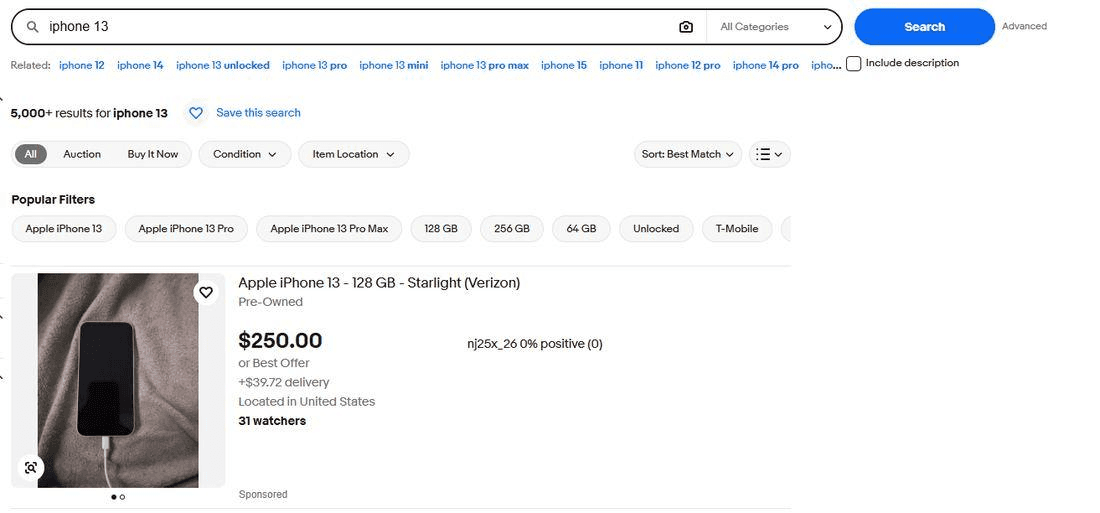
Exclude a word and it still reports 5,000+. On a broad search the ceiling hides whatever the operator did, which is most likely why write-ups of this topic contain no measurements.
So the searches below use dyson v8 animal. It returns 550 listings, well under the ceiling, and the results around it are full of brushes, batteries, filters and spare parts rather than vacuums. That noise is what makes an exclusion measurable.
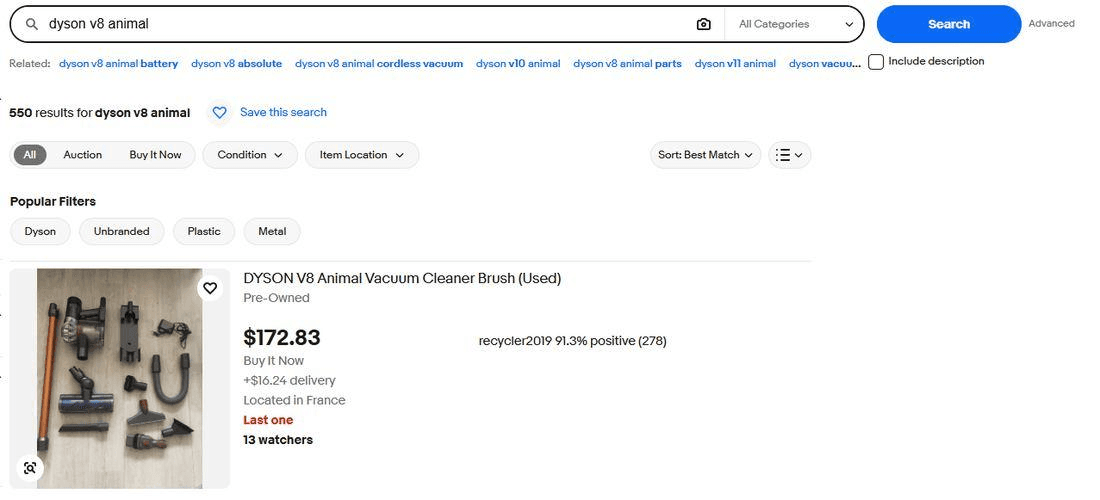
Quotes work, and they cut harder than you expect
The same three words in quotes return 32 listings. That’s a 94% cut and the largest change any operator here produces.
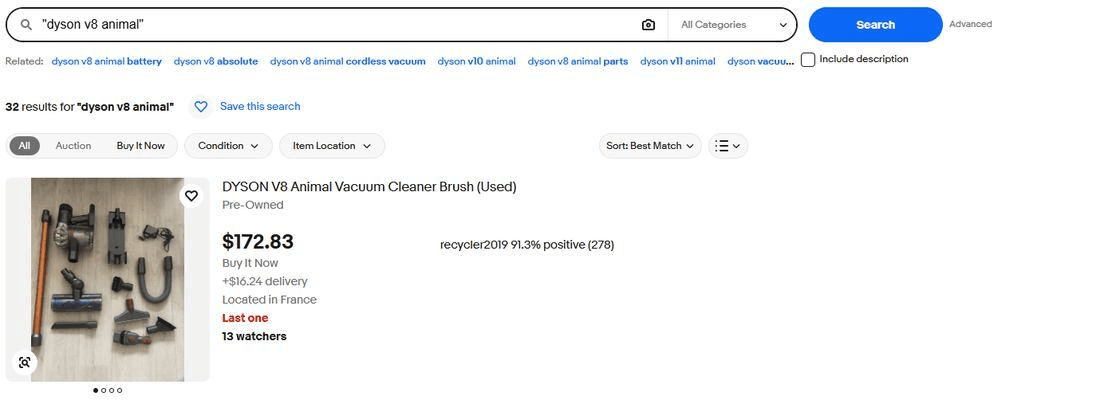
Without quotes eBay treats your words as three separate requirements and matches them anywhere in a title, so “Animal Hair Brush for Dyson V7 V8 V10” qualifies. With quotes the words have to sit together in that order, which is what you meant when you typed them.
Quotes do something else that nobody advertises. They stop eBay substituting your keywords for ones it thinks you meant, and they stop it walking you into a category on its own. If a search you’ve used for years suddenly returns the wrong things, quoting one word is the fastest way to find out whether eBay changed what your words mean.
The cost is that 32 results is a narrow view of a 550-listing market. Reach for quotes when you know the exact model name or reference number. Don’t browse with them.
The minus sign doesn’t do what everyone says it does
Every guide states that a minus sign excludes listings containing that word. Here’s what it does instead.
| Query | Results | Change |
|---|---|---|
| dyson v8 animal | 550 | baseline |
| dyson v8 animal -brush | 189 | −66% |
| dyson v8 animal -brush -battery -filter | 112 | −80% |
The counts move and each additional exclusion cuts further, so the operator is doing something. Then you look at the page.
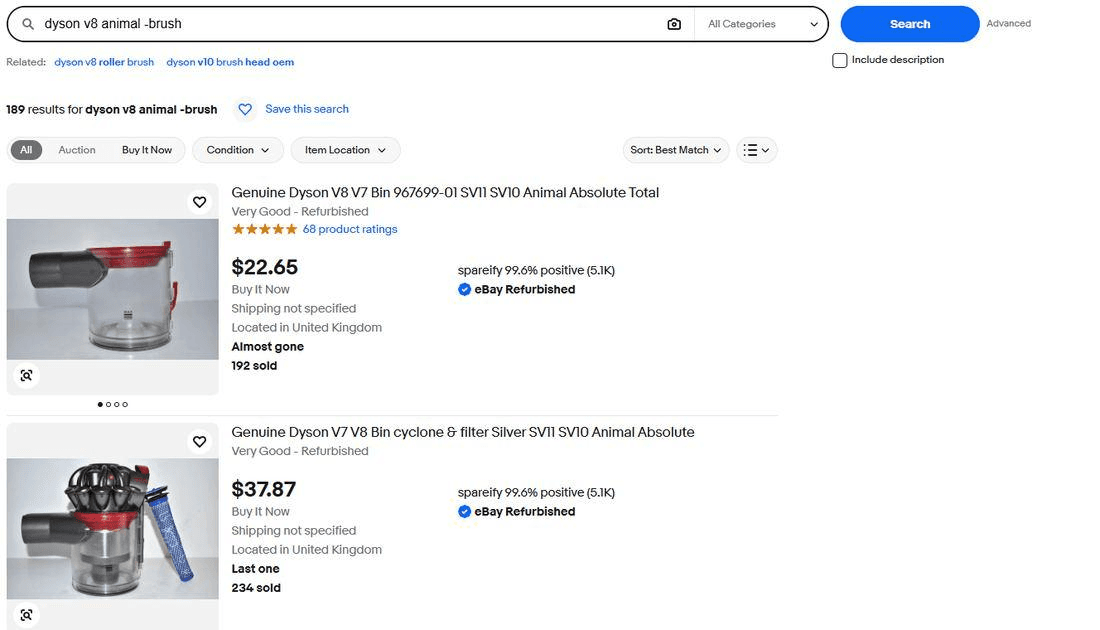
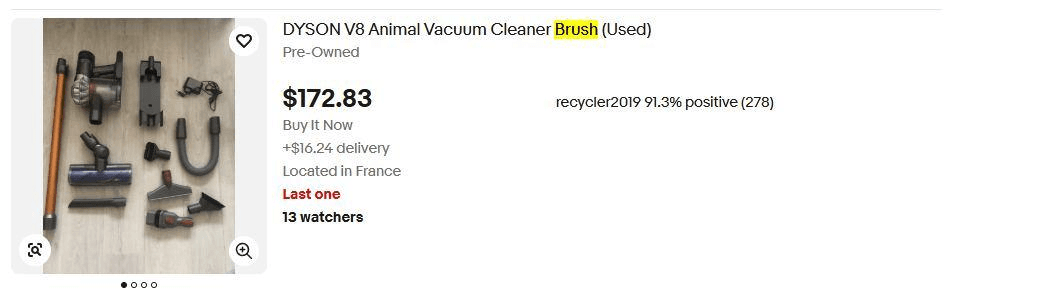
Add two more exclusions and the same listing moves up to first place, still organic, still carrying the excluded word.
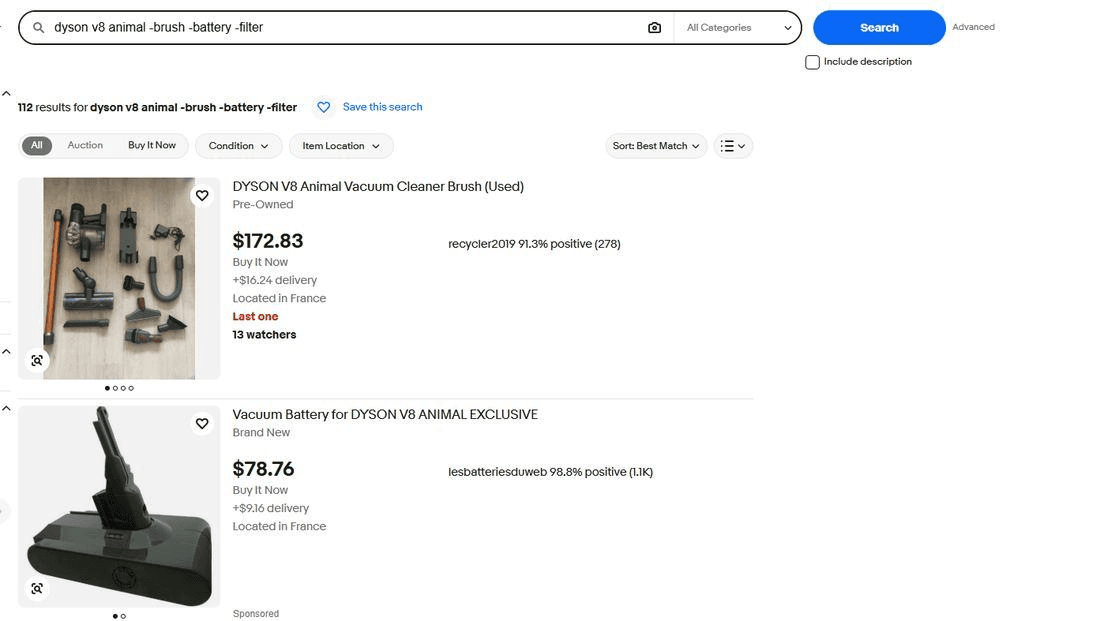
So the accurate description is narrower than the one you’ve been told. A minus sign shrinks the result set. It doesn’t guarantee the word is gone, and the listings that survive can rank at the top of what’s left. If you scan the first page for deals, which is what most people do, the exclusion you typed may have removed nothing you were actually looking at.
This matters most in exactly the situation people reach for it. You exclude “case” to find phones rather than accessories, glance at the first few results, see accessories anyway, and conclude eBay search is broken. It isn’t broken. It’s doing a weaker job than the word “exclude” implies.
Stacking exclusions doesn’t clear the page
The obvious response to a leaky exclusion is more exclusions. We ran ten.
dyson v8 animal -brush -battery -filter -charger -case -parts -tool -head -hose -wand
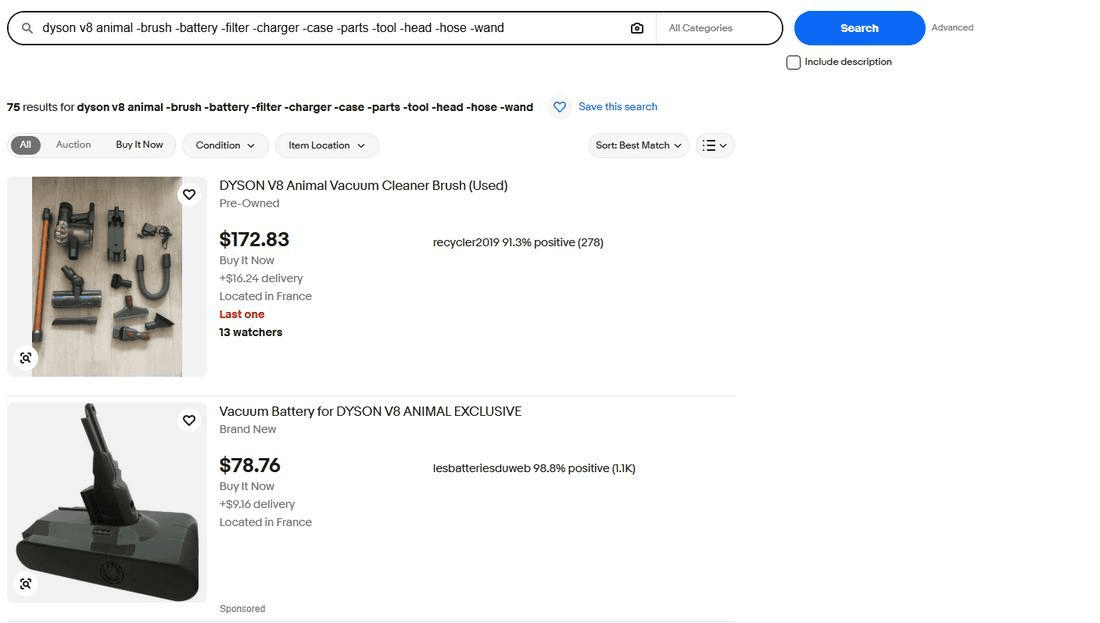
Ten exclusions cut the set by 86% and left the two things you most explicitly asked to remove at the top of what remained. There’s no number of minus signs that fixes this, because the problem isn’t that you used too few.
A space after the minus sign is worse than no operator at all
Every guide warns you not to put a space between the minus and the word. None say what happens if you do.
| Query | Results |
|---|---|
| dyson v8 animal | 550 |
| dyson v8 animal -brush | 189 |
| dyson v8 animal - brush | 87 |
The broken version returns fewer listings than the working one. If the space merely cancelled the operator you’d expect to land back near 550, and you don’t.
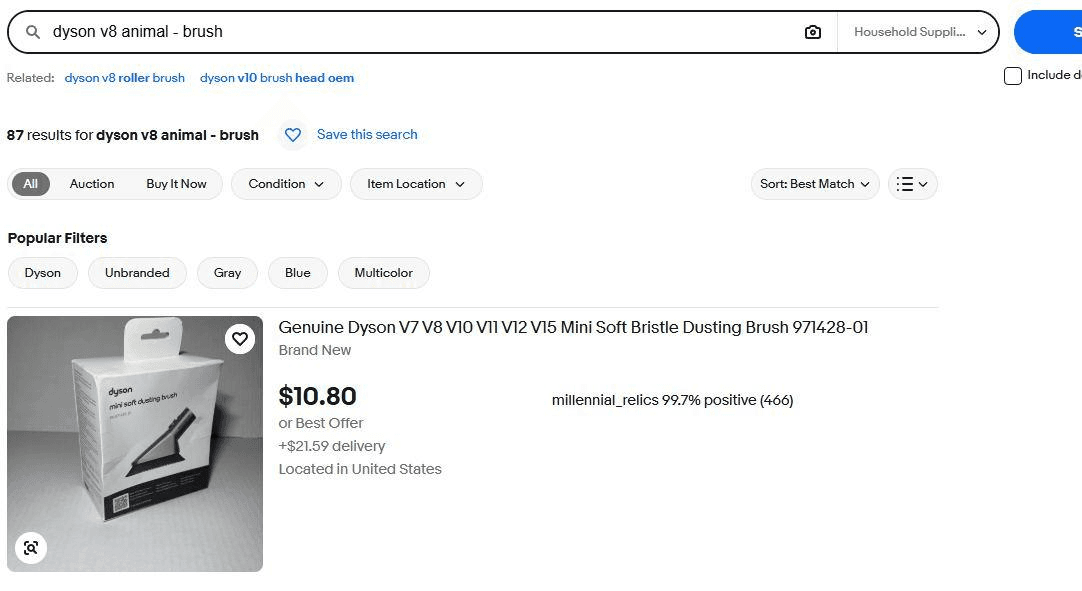
So the space doesn’t disable the exclusion. It hands eBay a query it can’t parse, and eBay guesses. You end up with a sixth of the market, filed under the wrong department, led by the exact item you asked to remove.
Quotes work inside an exclusion, and they’re worth the extra typing
| Query | Results | Top of the first page |
|---|---|---|
| dyson v8 animal | 550 | a brush leads |
| dyson v8 animal -brush | 189 | a brush is second |
| dyson v8 animal -"roller brush" | 200 | filter, battery, cyclone |
The two exclusions sit eleven listings apart, which makes them look interchangeable. They aren’t.
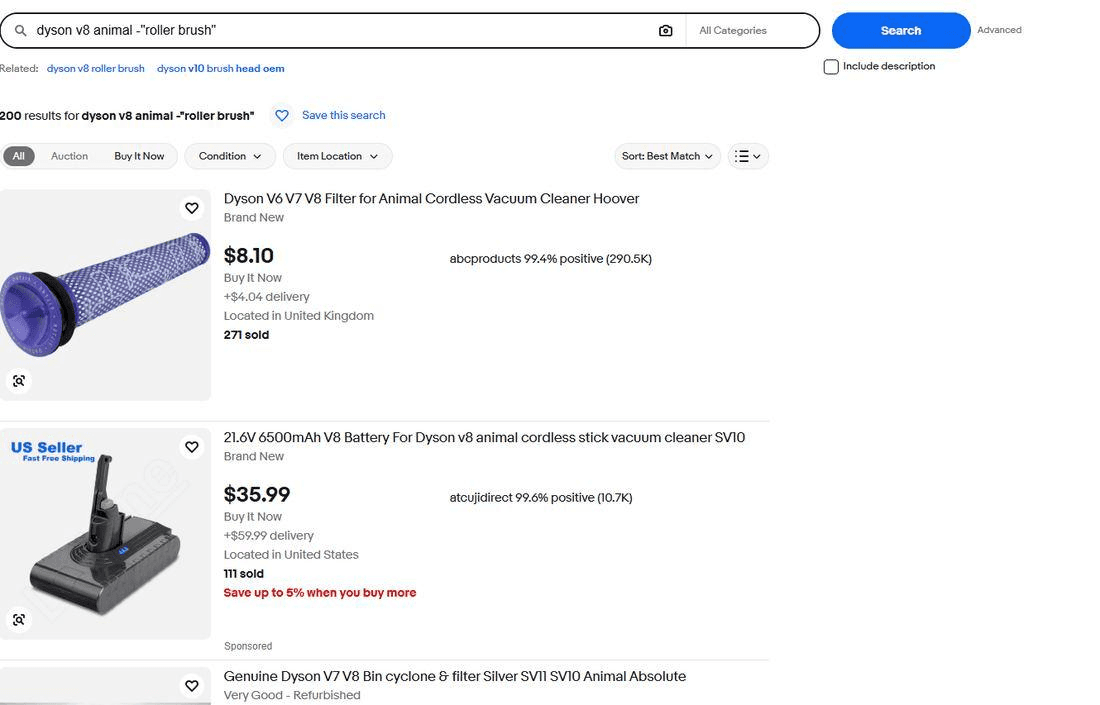
Excluding a phrase also keeps listings you wanted. Blocking every “brush” removes soft dusting brushes and brush bars you might have been happy to see. Blocking “roller brush” removes the specific thing crowding your results.
Count the results and the two look equivalent. Read the first page and they’re not. This is the clearest argument in the article for judging an operator by what appears on screen rather than by the number above it.
Include description breaks the minus sign completely
There’s a checkbox beside the search bar labelled Include description. Tick it and eBay reads listing bodies as well as titles. It also stops exclusions working.
| Query | Description off | Description on |
|---|---|---|
| dyson v8 animal | 550 | 697 |
| dyson v8 animal -brush | 189 | 1,000+ |
| dyson v8 animal -roller -brush | not run | 1,000+ |
Read the right-hand column again. The baseline is 697 listings. Excluding a word raises it above a thousand, and adding a second exclusion doesn’t bring it back down.
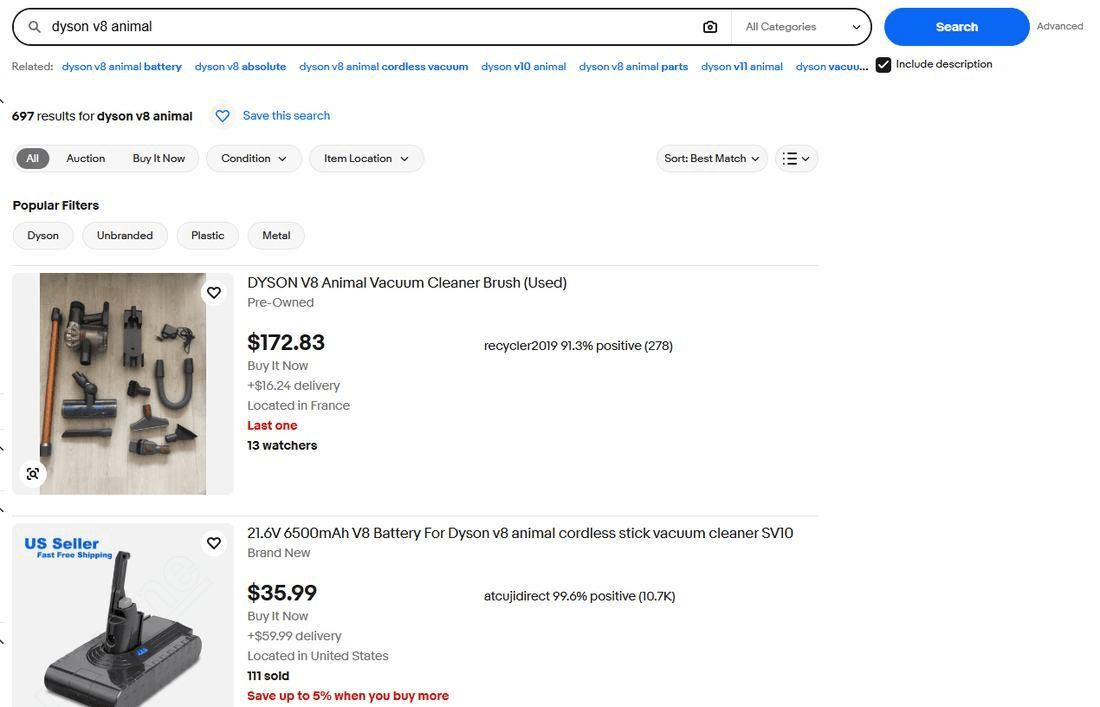
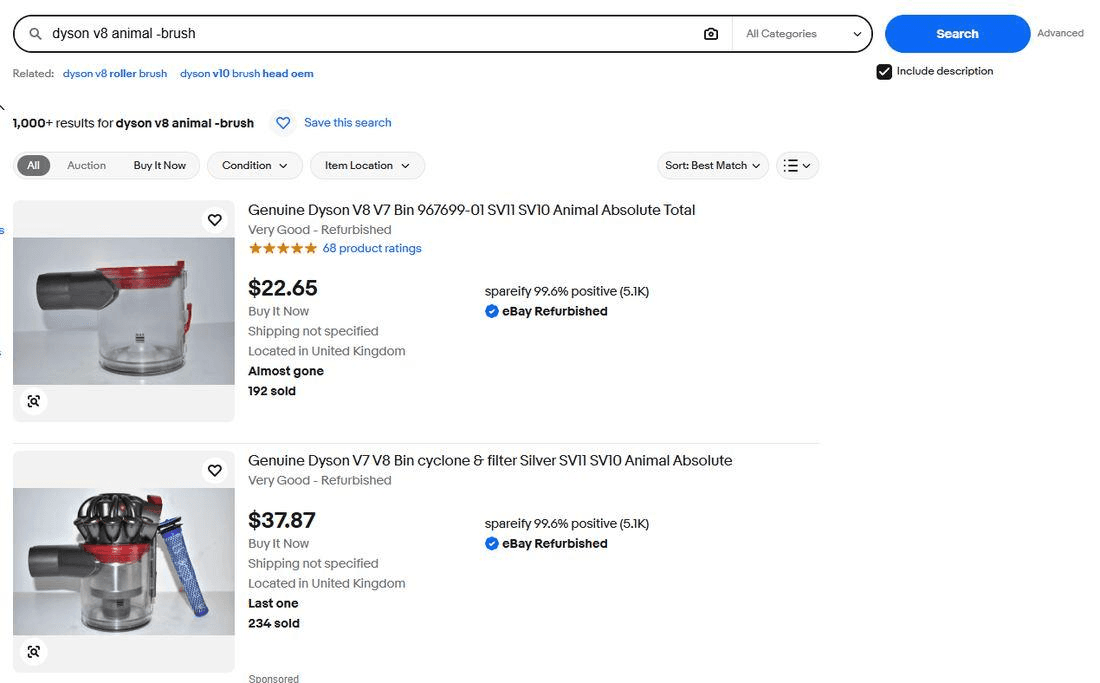
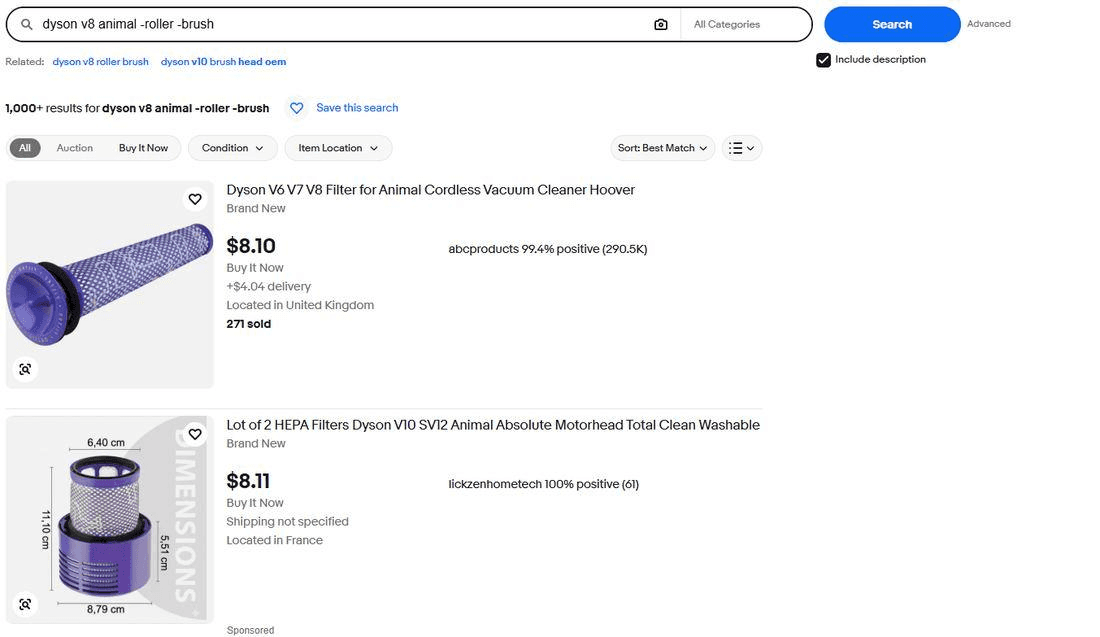
We’re not going to guess at the mechanism, because eBay documents none of this. What the numbers establish is narrower and enough to act on. With Include description ticked, a minus sign doesn’t remove listings. Untick the box before you use exclusions, and if you need descriptions searched, accept that you’re searching without them.
Parentheses behave, and the advice about them is wrong
| Query | Results |
|---|---|
| dyson v8 animal | 550 |
| (dyson v8 animal,dyson v7 animal) | 56 |
| (dyson v8 animal, dyson v7 animal) | 56 |
| (dyson v8 animal,dyson v7 animal) -brush | 52 |
Two things here contradict the standard advice.
First, the space after the comma. Every guide tells you to leave it out or the operator breaks. Both versions return 56.
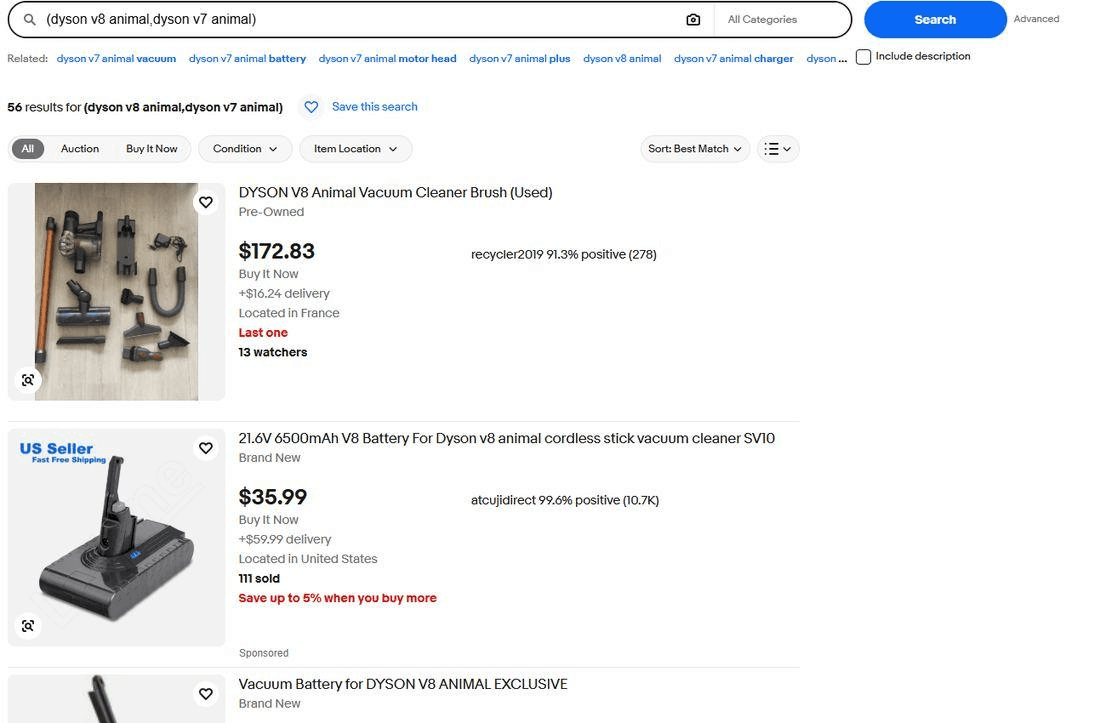
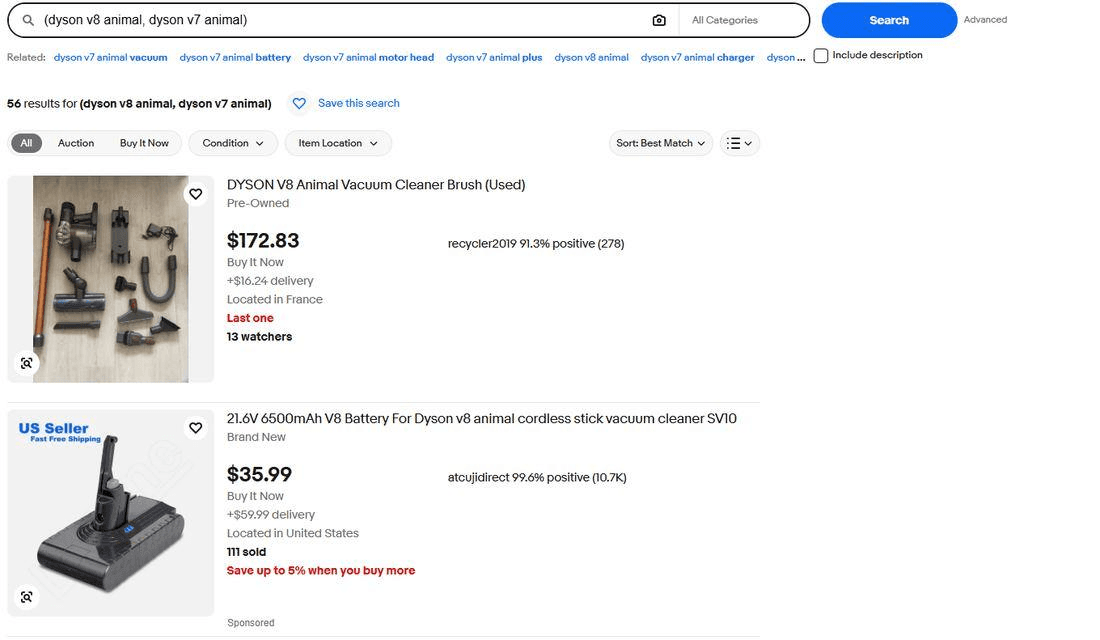
Second, what parentheses actually do. They’re described as an OR, which implies a wider search, and 56 is a tenth of the 550 a plain search returns. Grouping terms this way appears to bind each one together the way quotes do, so you’re running two exact searches rather than loosening one. That makes parentheses a precision tool, not an expansion tool, which is the opposite of how they’re usually sold.
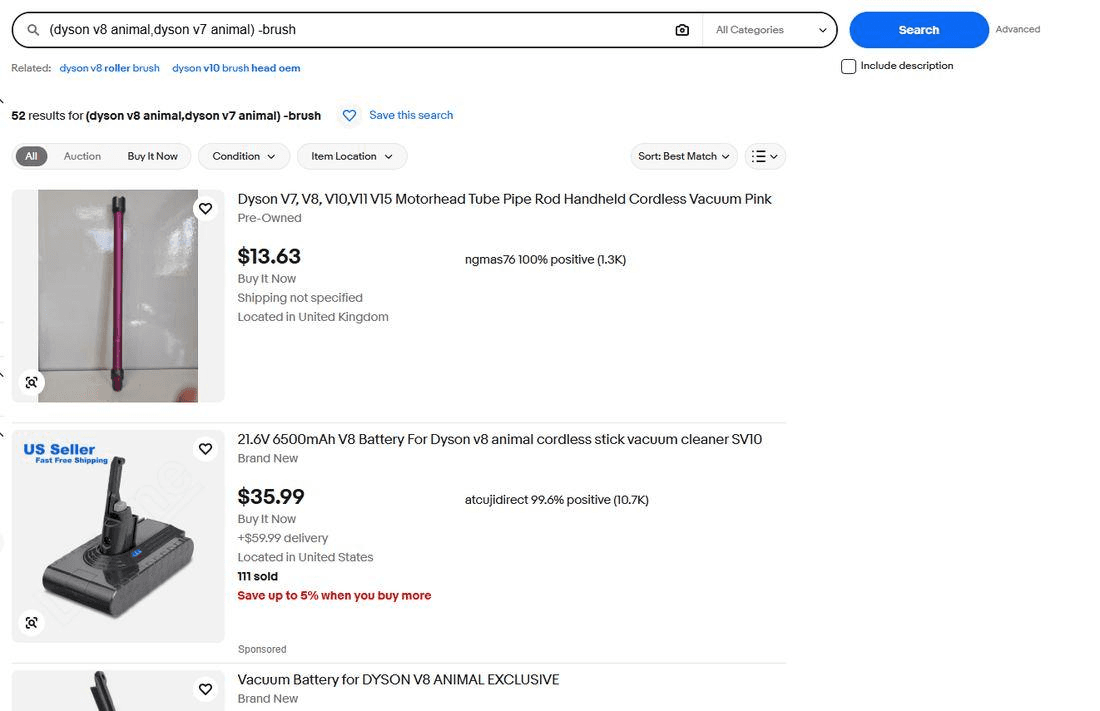
Adding -brush takes 56 to 52 and clears the brush off the top, where the same exclusion on the plain search left one sitting second. Narrow the query first and the exclusion has less to do.
Case doesn’t matter and the asterisk isn’t a wildcard
Two quick ones, because both get repeated as rules and neither deserves your attention.
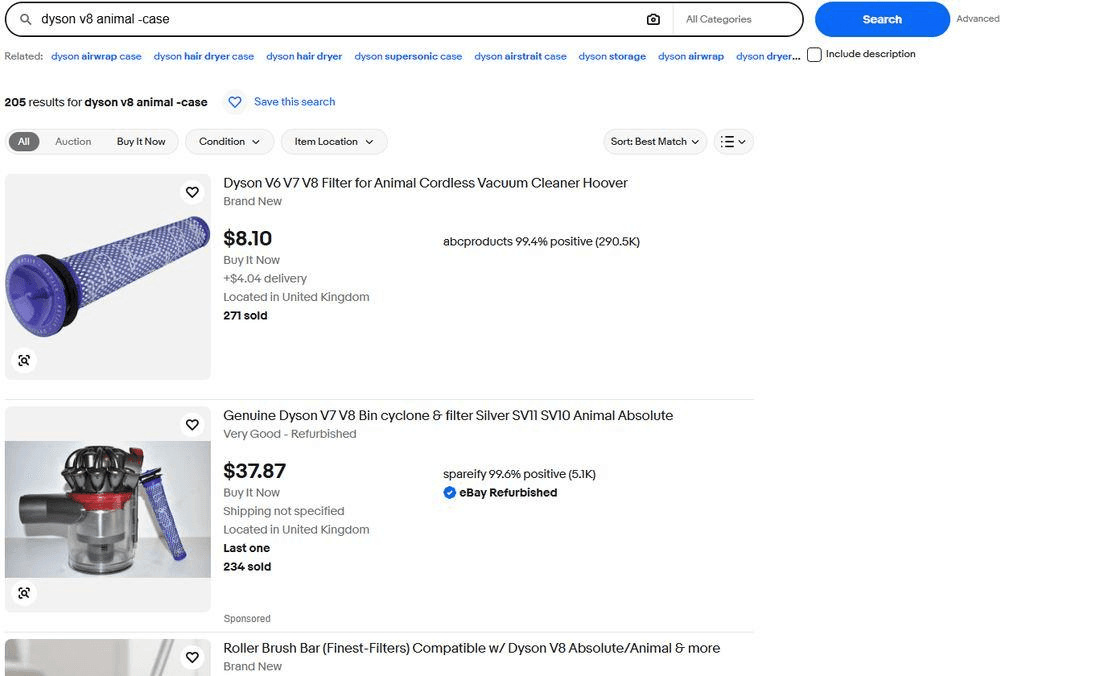
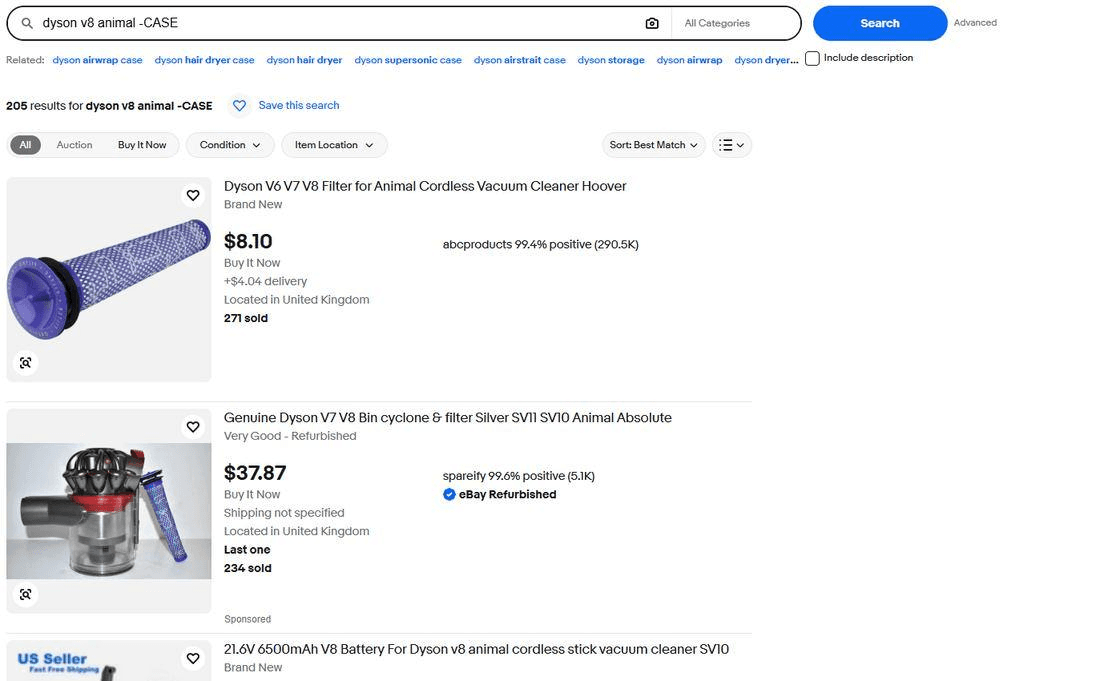
Capitals are ignored. -case and -CASE both return 205.
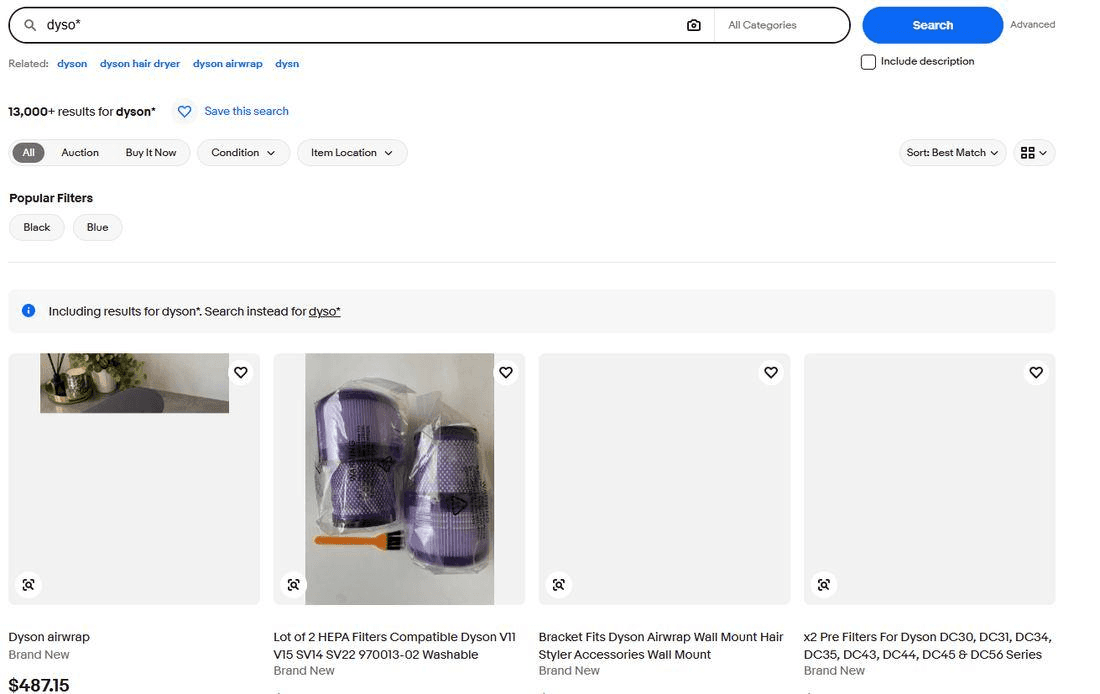
The asterisk does nothing useful. eBay dropped wildcard search in 2012, and what sits in its place isn’t a narrower version of the same feature.
Operators move you between categories, and that’s half of what they do
Watch the category selector beside the search bar. It changes on its own, and the operators change it.
| Query | Category eBay chose |
|---|---|
| dyson v8 animal | All Categories |
| dyson v8 animal - brush | Household Supplies |
| canon 70 200 | All Categories |
| canon 70-200 | Lenses |
The hyphen case is the useful one. A hyphen inside a product name doesn’t get read as an exclusion, so canon 70-200 keeps the 200 and still leads with 70-200mm lenses. What it does is file your search under Lenses.
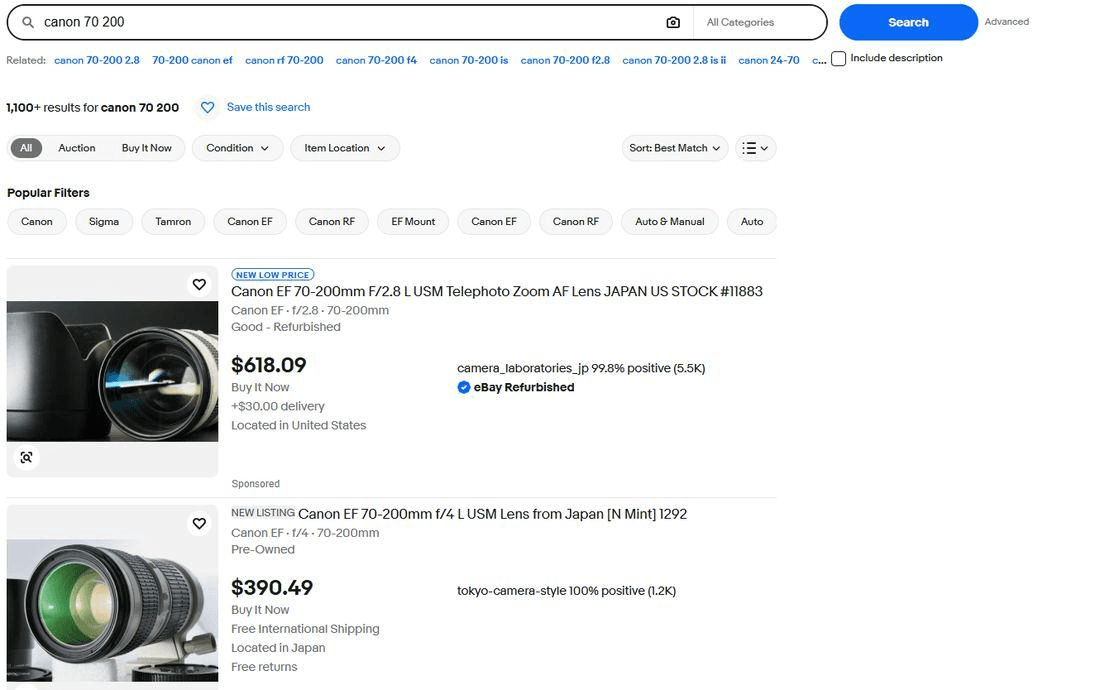
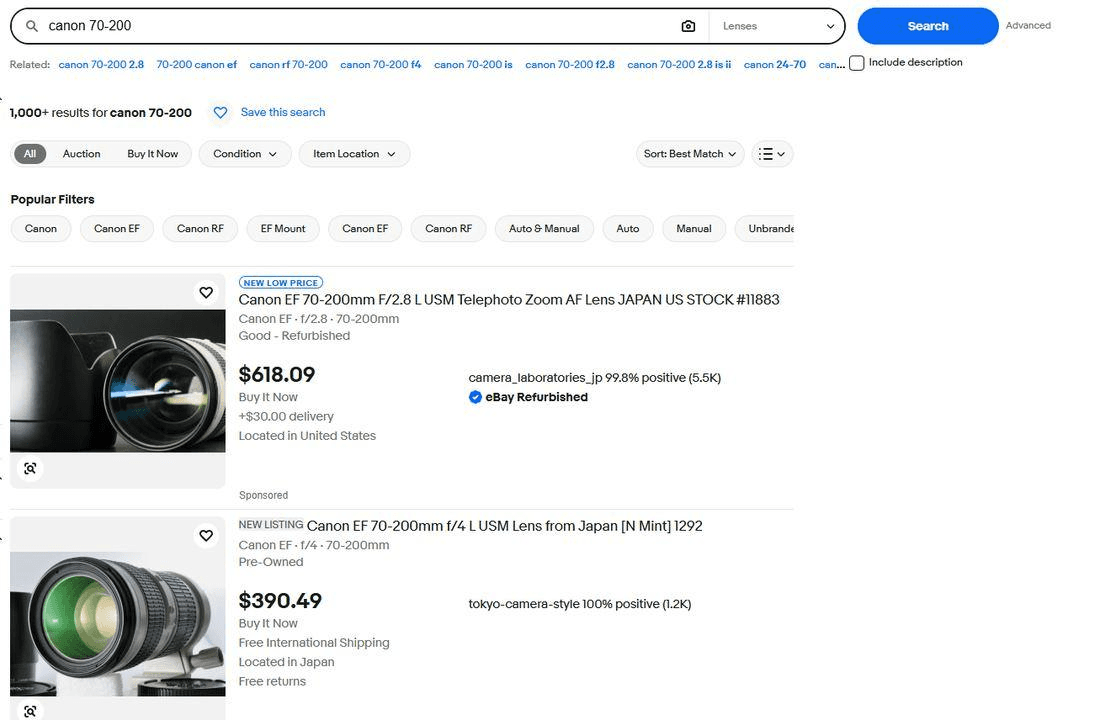
Helpful when you want lenses, unhelpful when you wanted the whole market including kits, cases and adapters. Either way it happened silently, and the only sign is a dropdown most people never look at. Check it before you decide an operator broke your search. Often the operator worked and eBay moved the goalposts around it.
What to actually type
- Quotes work. Use them when you know the exact model name or reference number.
- Parentheses work too. Group the versions you’d accept rather than listing the words you refuse.
- The minus sign shrinks your results without clearing the word off the page. Don’t trust it on its own.
- Excluding a phrase beats excluding a word. Pick the thing that’s actually crowding your results.
- Never leave a space after the minus. eBay reparses the query and files you under a category you didn’t ask for.
- Untick Include description before you exclude anything, or the exclusions stop working.
- Capitals make no difference, and the asterisk does nothing at all.
- Watch the category dropdown beside the search bar. Operators move it without telling you.
- Judge by the first page, not the result count. They disagree more often than you’d think.
The limit none of these operators reach
Operators decide which listings eBay shows you. They have nothing to say about when.
An underpriced listing sells in minutes, faster in electronics and trading cards. You can build the most precise query in this article, and it still only returns what was already there when you pressed search. Run it every twenty minutes for a week and you get two things: a listing you missed four hours ago and a bot-detection screen.
Lotify watches eBay listings as they publish and sends each match to Telegram within seconds, one message per listing, with the photo, the price and the link. You set the keywords, the marketplace, the price range and the words to exclude, and the exclusions are yours rather than eBay’s interpretation of them.
Free Trial Available
Lotify offers a 7-day free trial with no registration or credit card required. Test it out and see how many deals you’ve been missing.
It costs money after the trial, $19.99 a month for up to 12 searches, and it lives in Telegram, so you’ll be installing that if you don’t have it. If you buy on eBay a few times a year, quotes and parentheses will serve you fine and you shouldn’t pay for more. If you’re running the same query every day and losing items to someone faster, the problem was never your syntax.
FAQ
Which eBay search operators still work?
Quotes and parentheses work. Quotes around a phrase cut hardest of anything we tested: dyson v8 animal went from 550 results to 32. Parentheses work too, but they narrow rather than widen. Excluding a quoted phrase with -"two words" works well.
The minus sign on a single word only partly works, a space after the minus backfires, and the asterisk wildcard is dead.
How do I exclude words from an eBay search?
Put a minus sign directly in front of the word with no space, such as dyson v8 animal -brush. It shrinks the result set, but it does not guarantee the word is gone: in our test the second listing on the page still had “Brush” in the title.
Excluding a phrase in quotes, such as -"roller brush", gives a cleaner first page. Untick Include description before you exclude anything.
Why do excluded words still show up in my eBay results?
Because the minus sign on eBay shrinks the result count without clearing the word off the page. Even with ten exclusions, the top two results in our test were a brush and a battery, both words we had excluded by name, and neither listing was promoted.
If Include description is ticked, exclusions stop working almost entirely: excluding a word raised the count from 697 to over 1,000.
What happens if I put a space after the minus sign on eBay?
It is worse than no operator at all. dyson v8 animal - brush returned 87 results, fewer than the working -brush version, and eBay switched the category from All Categories to Household Supplies. The first result was a dusting brush, the exact item we asked to remove.
Do I need to remove the space after the comma in eBay parentheses searches?
No. (dyson v8 animal,dyson v7 animal) and (dyson v8 animal, dyson v7 animal) both returned 56 results. Note that parentheses narrowed the search from 550 to 56 rather than widening it, so they work as a precision tool, not an expansion tool.
Does eBay support the asterisk wildcard?
No. eBay dropped wildcard search in 2012. Searching dyso* returned over 13,000 listings with a notice reading “Including results for dyson*”. eBay did not match words starting with “dyso”; it decided you meant Dyson.
Is eBay search case sensitive?
No. Capitals are ignored: dyson v8 animal -case and dyson v8 animal -CASE both returned 205 results.

2026-09-14
