Why Is Facebook Marketplace Search So Bad and How to Fix It

You type “dining table”, set a 20 mile radius, and get a chair or a table from 60 miles away. You search for a model number you know is listed because your friend posted it an hour ago, and Marketplace says “no results found”. Some mornings the search box does nothing at all.
These are three different problems. The first one is by design. The other two are bugs and settings, and most of them you can fix.
Why people say the search is bad, and the fix for each complaint

Marketplace search is a recommendation feed with a text box on top. Meta’s own Transparency Center describes it as an AI system that takes signals from your activity on Facebook, plus the location, category, condition, and price of listings, and predicts which ones you’ll find relevant. Relevance is the goal. Matching your words is one input among many. Every complaint in the Reddit and forum threads comes back to that design, and each one has a workaround.
“It ignores my keywords”
Search “iPhone 12 Pro” and you’ll see the plain 12 and the 13 Pro too, because the system treats your query as a topic, not a filter. Common words like “with” and “for” get dropped, and word order changes the results. Worse, there’s no way to say what you don’t want. Type “iphone 12 pro” and half the page is cases, screen protectors, and the Max.
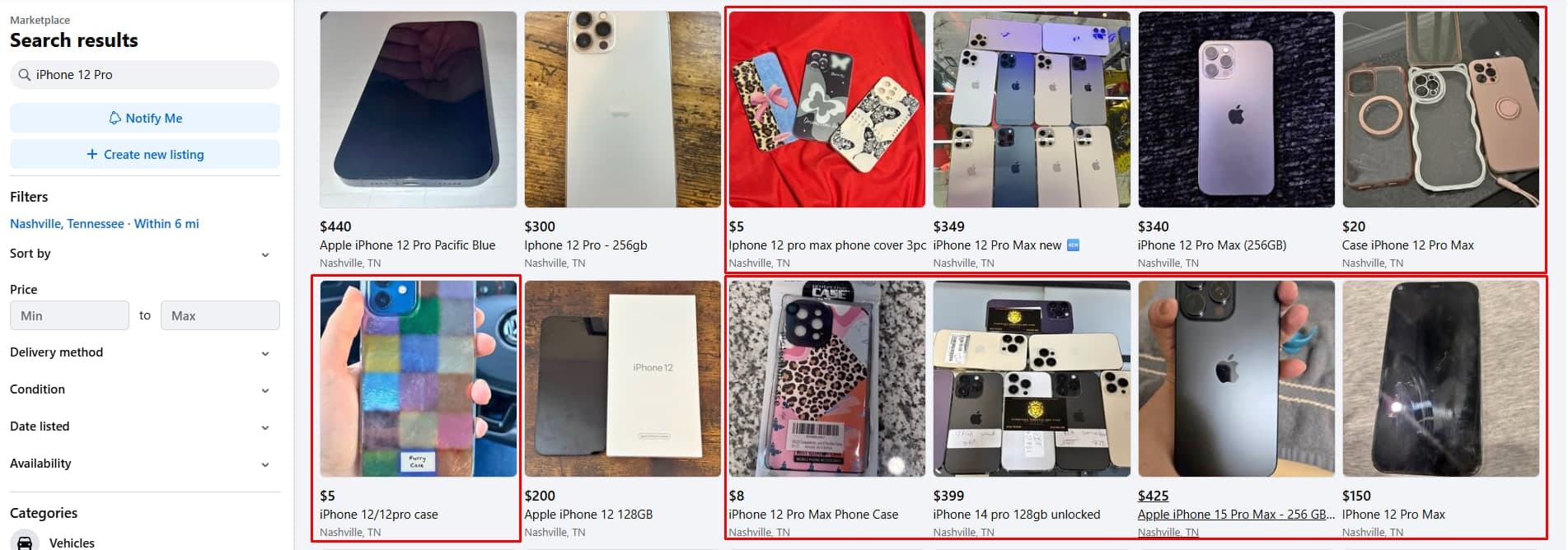
The fix inside Marketplace: put the model or the most specific word first, wrap an exact phrase in quotation marks, and drop everything that isn’t brand, model, or feature. That narrows the results. It still can’t remove the cases.
For that you need an exclude filter, which Marketplace doesn’t have and Lotify does. You type the query once and list the words that disqualify a listing:

Every listing with “max” or “case” in it is dropped before the alert goes out, so the only messages you get are for the phone itself.
“The filters don’t do anything”
Set a radius and Marketplace draws a circle as the crow flies, so a listing across a river counts as nearby. Then it adds a block underneath labeled results from outside your search, which routinely contains items that fit your filters better than the ones above.
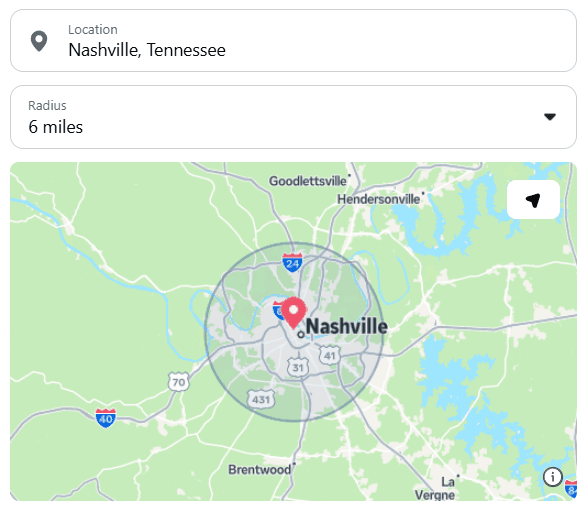
The fix inside Marketplace: set the location pin by hand instead of trusting GPS, keep the radius small, and always scroll into that second block before giving up.
Lotify uses the same idea, minus the second block. You drop a pin on the map, set a radius in kilometers, and that circle is the search:
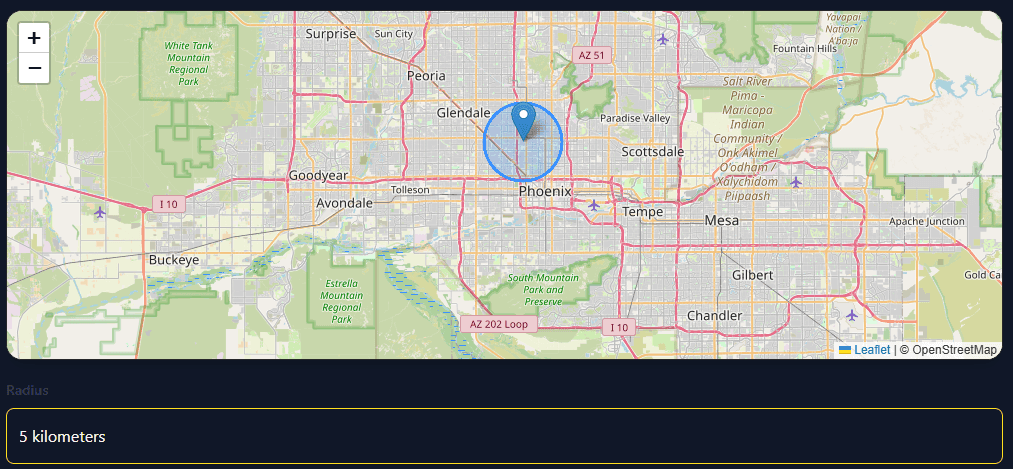
A listing inside the circle triggers an alert. A listing outside it doesn’t, and nothing from outside your search gets appended underneath.
“It keeps showing me the same items.”
Every listing you tap, save, or hide feeds the ranking. Meta says the system hides content similar to listings you’ve hidden before. Hide a few overpriced couches and the model may decide you don’t want couches.
The fix inside Marketplace: stop hiding things. Scroll past what you don’t want, save what you do, and if the feed is already wrecked, run your searches from a desktop browser in a private window, where less of your history follows you.
Lotify sidesteps this because it never touches your account. It doesn’t log in as you, so there’s no history to learn from and no profile to rank against. Every search runs clean, the way Marketplace would look to someone who had never used it, and your alerts are the listings that match your filters, not the listings a model thinks you’d like.
“I never see new listings”
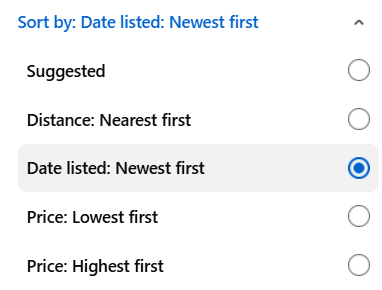
Sorting by relevance buries them. A listing posted ten minutes ago has no views or saves yet, so it ranks below a week-old listing that already has messages.
The fix: switch the sort to newest at the start of every session. Marketplace forgets this setting, so you’ll do it every time.
“no results found”
When the search returns nothing for something you know exists, the cause is almost always one of five things.
Location. Marketplace uses the location set in the filter, not where you are. A VPN, a moved pin, or a city picked months ago will empty your results. Open the location filter, set the city and radius by hand, and turn off any VPN.
Filters left on from last time. A price ceiling, a condition, or a category from an earlier search stays active. Clear everything and search again with only the keyword.
Seller vocabulary. The seller wrote “sofa” and you typed “couch”. Or “fridge” for “refrigerator”, or “MBP” for “MacBook Pro”. Marketplace’s loose matching helps here sometimes, and fails other times. Try the two or three ways a seller might phrase it.
Account limits. New accounts, accounts under 18, and accounts flagged for policy issues get a restricted Marketplace, and the restriction can show up as empty searches rather than an error. If a friend’s account finds the item and yours doesn’t, this is it.
App state. The mobile app caches results. Force close it, clear the cache, or try the same search in a desktop browser. If desktop works and the app doesn’t, the app is the problem.
Why the search sometimes doesn’t work at all
The third case is when the box takes your text and nothing happens, or the page loads and the results area stays blank. Check whether it’s you or Facebook first. Look at Downdetector for a spike in Facebook reports, or search from a second device. Marketplace search has gone down for everyone several times, and on those days no setting on your side helps. If it’s only you, update the app, restart it, and log out and back in.
On desktop, try a private window with extensions off; ad blockers and privacy extensions break the Marketplace scripts more often than you’d expect. If none of that works and the issue has lasted more than a day, report it through Help and Support inside the app and wait.
When the fixes stop being worth it
All of the above works if you search once a week. If you search every day for the same handful of items, it turns into a part-time job.
Lotify does the searching for you. You set keywords, price range, and location once. Every listing that matches arrives in Telegram within seconds of appearing on Marketplace, with the title, price, photo, and a direct link. Nothing is reordered by relevance, nothing is hidden because you hid something similar last month, and nothing waits for you to refresh.
Free Trial Available
Lotify offers a 7-day free trial with no registration or credit card required. Test it out and see how many deals you’ve been missing.
Lotify also doesn’t score or rate listings. Every match comes through and you decide, because you know whether that “table” is the one you want and a model doesn’t.
The trial runs 7 days with no card. Run it beside your normal Marketplace searches for a week and compare what each one shows you. If Marketplace search works well enough for you, you’ve lost nothing. If it doesn’t, you’ll see the difference by day two.
FAQ
Why does Facebook Marketplace ignore my keywords?
Because Marketplace search is a recommendation feed with a text box on top. Meta’s Transparency Center describes it as an AI system that takes signals from your activity on Facebook, plus the location, category, condition, and price of listings, and predicts which ones you’ll find relevant. Matching your words is one input among many, so the system treats your query as a topic rather than a filter. Search “iPhone 12 Pro” and you’ll see the plain 12 and the 13 Pro too.
How do I search Facebook Marketplace more precisely?
Put the model or the most specific word first, wrap an exact phrase in quotation marks, and drop everything that isn’t brand, model, or feature. That narrows the results, but it still can’t remove the cases and screen protectors — Marketplace has no exclude filter, so there is no way to say what you don’t want.
Why do Facebook Marketplace filters show items outside my radius?
Marketplace draws the radius as the crow flies, so a listing across a river counts as nearby. It also adds a block underneath labeled results from outside your search, which routinely contains items that fit your filters better than the ones above. Set the location pin by hand instead of trusting GPS, keep the radius small, and always scroll into that second block before giving up.
Why does Marketplace keep showing me the same items?
Every listing you tap, save, or hide feeds the ranking, and Meta says the system hides content similar to listings you’ve hidden before. Hide a few overpriced couches and the model may decide you don’t want couches. Stop hiding things, scroll past what you don’t want, save what you do, and if the feed is already wrecked, run your searches from a desktop browser in a private window.
Why does Facebook Marketplace say "no results found" for items that exist?
It is almost always one of five things. Location: Marketplace uses the location set in the filter, not where you are, so a VPN or an old pin will empty your results. Filters left on from last time: a price ceiling, condition, or category from an earlier search stays active. Seller vocabulary: the seller wrote “sofa” and you typed “couch”. Account limits: new accounts, accounts under 18, and accounts flagged for policy issues get a restricted Marketplace that can show up as empty searches. App state: the mobile app caches results, so force close it or try the same search in a desktop browser.
Facebook Marketplace search is not working at all. What do I do?
Check whether it’s you or Facebook first. Look at Downdetector for a spike in Facebook reports, or search from a second device — Marketplace search has gone down for everyone several times, and on those days no setting on your side helps. If it’s only you, update the app, restart it, and log out and back in. On desktop, try a private window with extensions off, since ad blockers and privacy extensions break the Marketplace scripts more often than you’d expect. If nothing works after a day, report it through Help and Support inside the app.
Is there a better way than fixing Marketplace search every time?
All of the workarounds hold up if you search once a week. If you search every day for the same handful of items, it turns into a part-time job. Lotify does the searching for you: you set keywords, price range, and location once, and every matching listing arrives in Telegram within seconds of appearing, with the title, price, photo, and a direct link. Nothing is reordered by relevance, nothing is hidden because you hid something similar last month, and nothing waits for you to refresh.

2026-08-30
