Facebook Marketplace Saved Searches Guide
A saved search is Marketplace remembering a query for you. You type “road bike”, set the price and radius once, save it, and Facebook is supposed to tell you when a new listing matches. That’s the whole feature. What people argue about is whether the telling part works.

How to save a search on Facebook Marketplace
On desktop, run the search with your filters set, then click Notify Me under the search box. On the app, run the search and tap the bell icon next to the query. Either way the search gets stored, and you’ll find the list under Marketplace, then Saved, then Searches, or under the bell on the Marketplace home screen depending on which version of the app you have.
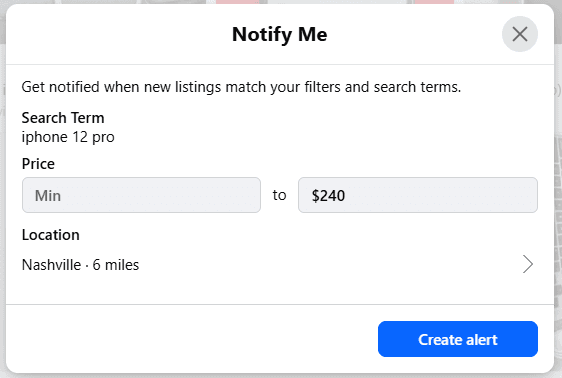
To delete one, open the same list and tap the three dots or the bin next to the search.
Where to find every saved search
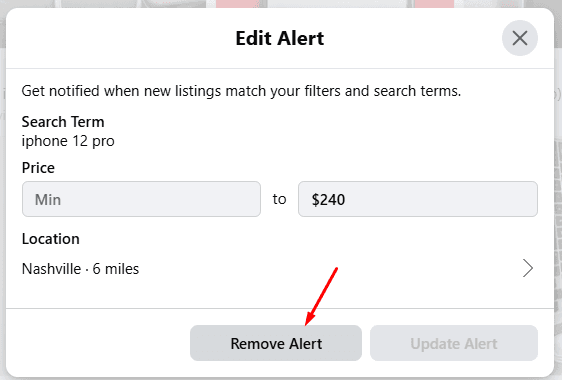
Facebook calls them search alerts, which is why people can’t find them. On desktop, open Marketplace, click Buying in the left menu, then Your alerts. Every saved search is listed there with its filters, and each one has a toggle to pause it and an Edit link to change it.

On the app the path is Marketplace, then your profile icon or the You tab, then Alerts. Same list, same toggles. To delete a search, open Edit and remove it, or just switch the toggle off and leave it there for later.
How often the alerts actually arrive
Facebook’s announcement says you’ll get updates when new listings match. In practice the alert is a batch. Matching listings from the day get bundled into one notification, and it lands on Facebook’s schedule, usually once a day, sometimes not at all when the notification queue hiccups. Push notifications on the app arrive faster. Phone battery settings and Facebook’s own notification categories can swallow them on the way. We covered the settings side in our guide to Facebook Marketplace notifications.
The match itself is also loose. A saved search for “road bike” alerts you about bike racks and kids’ bikes, because the alert uses the same relevance ranking as the results page.
For a casual buy, a couch sometime this month, a used lawnmower before summer, a daily digest is enough. You’ll see the listing, the seller will still have it, nobody else was racing you.
For anything competitive it isn’t. Free furniture, underpriced electronics, a specific bike model, a car under market. Those go to whoever messages first, and first is measured in minutes. A batch that lands the next morning is a list of things that sold yesterday.
Why use Lotify instead of Saved Searches
Lotify runs from the cloud and sends every match to Telegram within seconds of it appearing, one message per listing, with the photo, price, and link. No batching, no relevance ranking, no dependence on Facebook’s notification queue or your phone’s battery mode. You add words to exclude so “road bike” doesn’t bring you bike racks. And it never logs in as you, so nothing you tap on Marketplace changes what you’re alerted about.
Free Trial Available
Lotify offers a 7-day free trial with no registration or credit card required. Test it out and see how many deals you’ve been missing.
Lotify isn’t for everyone, and it’s fair to say that plainly. It costs money after the 7 day trial, $19.99 a month for up to 12 searches. It lives in Telegram, so if you don’t use Telegram you’ll be installing it for this. And if you buy something on Marketplace twice a year, the native saved search will serve you fine and you shouldn’t pay for more. It’s for the person who checks Marketplace every day for the same handful of things and keeps losing them to someone faster. If that’s you, open Telegram, start @lotifybot, pick Facebook Marketplace, type the search you’ve already saved on Facebook, and run both for a week. Count which one told you first.
FAQ
How do I save a search on Facebook Marketplace?
On desktop, run the search with your filters set, then click Notify Me under the search box. On the app, run the search and tap the bell icon next to the query. Either way the search gets stored, and you’ll find the list under Marketplace, then Saved, then Searches, or under the bell on the Marketplace home screen depending on which version of the app you have.
Where are my saved searches on Facebook Marketplace?
Facebook calls them search alerts, which is why people can’t find them. On desktop, open Marketplace, click Buying in the left menu, then Your alerts. Every saved search is listed there with its filters, and each one has a toggle to pause it and an Edit link to change it.
On the app the path is Marketplace, then your profile icon or the You tab, then Alerts. Same list, same toggles.
How do I delete a Facebook Marketplace saved search?
Open the saved search list and tap the three dots or the bin next to the search. On the alerts screen you can also open Edit and remove it, or just switch the toggle off and leave it there for later.
How often do Facebook Marketplace saved search alerts arrive?
The alert is a batch. Matching listings from the day get bundled into one notification, and it lands on Facebook’s schedule, usually once a day, sometimes not at all when the notification queue hiccups. Push notifications on the app arrive faster, but phone battery settings and Facebook’s own notification categories can swallow them on the way.
Why does my saved search alert me about the wrong items?
The match is loose. A saved search for “road bike” alerts you about bike racks and kids’ bikes, because the alert uses the same relevance ranking as the results page rather than matching your words strictly.
Are Facebook Marketplace saved searches good enough?
For a casual buy — a couch sometime this month, a used lawnmower before summer — a daily digest is enough. You’ll see the listing, the seller will still have it, nobody else was racing you.
For anything competitive it isn’t. Free furniture, underpriced electronics, a specific bike model, a car under market: those go to whoever messages first, and first is measured in minutes. A batch that lands the next morning is a list of things that sold yesterday.
Is Lotify worth paying for instead of saved searches?
It depends on how often you buy. Lotify costs money after the 7 day trial — $19.99 a month for up to 12 searches — and it lives in Telegram, so if you don’t use Telegram you’ll be installing it for this. If you buy something on Marketplace twice a year, the native saved search will serve you fine and you shouldn’t pay for more.
It’s for the person who checks Marketplace every day for the same handful of things and keeps losing them to someone faster.

2026-08-30
